Install Tracking on WooCommerce
Install Perspection Tracking on WooCommerce | Setup
Connect Perspection to WooCommerce in under 5 minutes. Track orders, customers, products, and subscriptions with AES-256 encrypted webhooks.
Perspection connects to WooCommerce through a dedicated WordPress plugin combined with automatic webhook registration. The plugin installation takes under 5 minutes and produces complete server-side tracking coverage across 12 webhook topics spanning orders, customers, products, and subscriptions. Perspection tests the WooCommerce REST API v3 connection using Consumer Key and Consumer Secret authentication, fetches store metadata (name, currency, WooCommerce version), and auto-creates all 12 webhooks in a single operation. Credentials are stored encrypted with AES-256 (PGP symmetric encryption) in the control plane database. All webhook payloads are delivered to the workspace's ingestion endpoint and verified using HMAC-SHA256 signature validation with timing-safe comparison.
How do you connect Perspection to WooCommerce?
Perspection connects to WooCommerce through a 3-step process: install the WordPress plugin, configure API credentials (Consumer Key and Consumer Secret with read/write permissions), and verify the connection. Perspection validates credentials, tests the REST API v3 connection, and auto-creates 12 webhooks within a single database transaction.
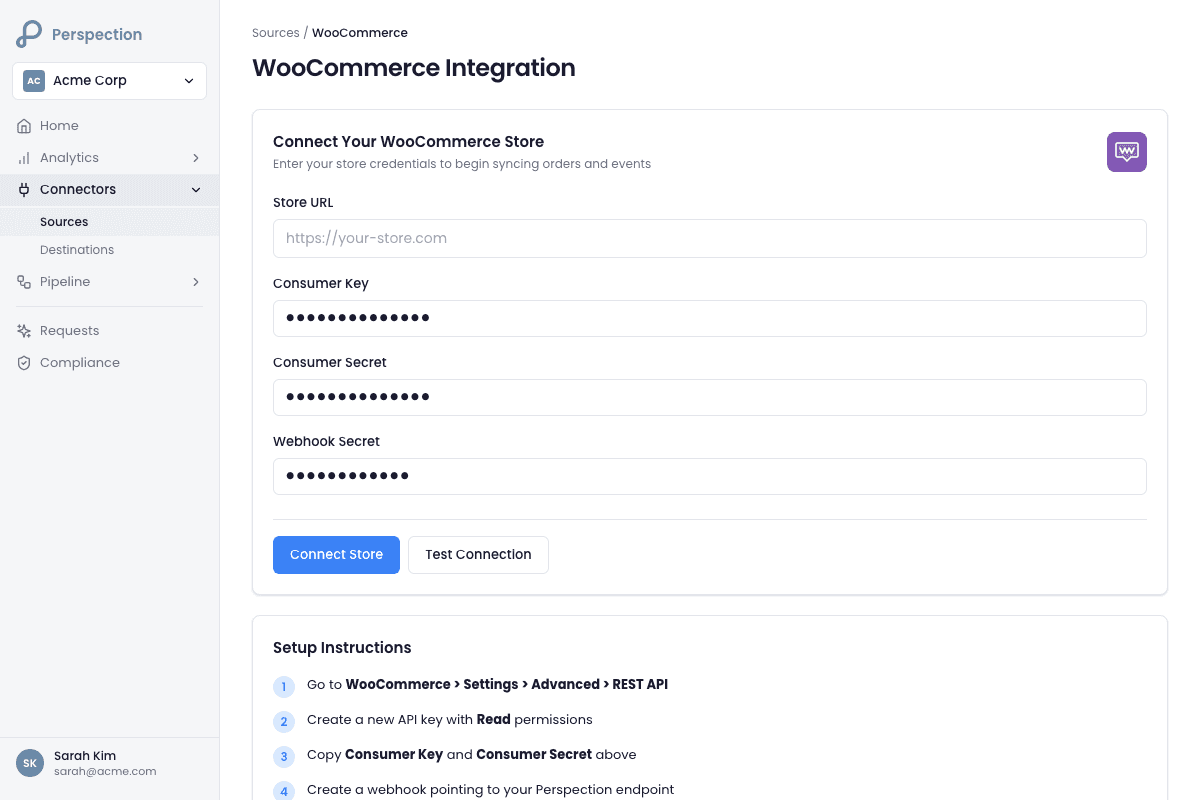
Step 1: Install the Perspection WordPress plugin
Open the Perspection dashboard and navigate to Connectors > Sources > WooCommerce.
Click the "Download Plugin" button to download the
perspection-for-woocommerce.zipfile.Open the WordPress admin panel for the WooCommerce store.
Navigate to Plugins > Add New > Upload Plugin.
Select the downloaded
.zipfile and click "Install Now."Click "Activate" to enable the Perspection for WooCommerce plugin.
Step 2: Configure API credentials
In the WooCommerce store's WordPress admin, navigate to WooCommerce > Settings > Advanced > REST API.
Click "Add Key" to generate new API credentials.
Set the Description to "Perspection Tracking."
Set Permissions to "Read/Write" -- Perspection requires read/write access to create webhooks and read order, customer, and product data.
Click "Generate API Key." WooCommerce displays a Consumer Key (beginning with
ck_) and Consumer Secret (beginning withcs_). Copy both values immediately -- WooCommerce only displays the Consumer Secret once.Return to the Perspection dashboard on the WooCommerce integration page.
Enter the WooCommerce store URL in the Site URL field (for example,
https://mystore.com). The URL must include thehttps://protocol prefix.Paste the Consumer Key into the Consumer Key field.
Paste the Consumer Secret into the Consumer Secret field.
Click "Connect." Perspection performs three operations in sequence: tests the WooCommerce REST API v3 connection by calling
/wp-json/wc/v3/system_status, fetches store information from/wp-json/wc/v3/settings/general, and creates all 12 webhooks via the WooCommerce REST API.
Step 3: Configure the browser-side plugin
After the API connection succeeds, the Perspection dashboard displays the workspace's publishable API key (
pk_*prefix) and the ingestion endpoint.In the WordPress admin, navigate to Settings > Perspection.
Paste the publishable API key into the API Key field.
Paste the ingestion endpoint URL into the Endpoint field. If a first-party custom domain is configured, Perspection uses the custom domain instead of the default ingestion endpoint.
Click "Save Changes."
Related: Create Your Workspace covers workspace provisioning prior to WooCommerce integration.
What does the Perspection WooCommerce plugin track?
Perspection tracks 12 server-side webhook topics and 8 browser-side event types from WooCommerce stores. Server-side webhooks cover orders, customers, products, and subscriptions (full lifecycle: creation, updates, deletion). Browser-side tracking captures page views, product views, cart activity, checkout events, and search queries with complete attribution data.
Server-side webhook topics (12 topics)
Perspection registers 12 webhooks automatically via the WooCommerce REST API v3. Each webhook is named with a Perspection - {topic} prefix for easy identification in the WooCommerce admin panel.
Order events (3 topics):
Webhook Topic | Perspection Event Name | Data Captured |
|---|---|---|
order.created | purchase_completed | Order ID, order number, status, total, subtotal, tax, shipping total, discount total, payment method, transaction ID, customer IP, line items (product ID, SKU, quantity, price), billing address, shipping address, coupon codes, currency |
order.updated | order_updated | Same fields as order.created, reflecting the updated order state including fulfillment, cancellation, and refund status changes |
order.deleted | order_deleted | Order ID, order number, deletion timestamp |
Customer events (3 topics):
Webhook Topic | Perspection Event Name | Data Captured |
|---|---|---|
customer.created | customer_created | Customer ID, username, email, first name, last name, role, billing address (including phone), shipping address, account creation date |
customer.updated | customer_updated | Same fields as customer.created, reflecting updated profile information |
customer.deleted | customer_deleted | Customer ID, email, deletion timestamp |
Product events (3 topics):
Webhook Topic | Perspection Event Name | Data Captured |
|---|---|---|
product.created | product_created | Product ID, name, slug, permalink, type, status, SKU, price, regular price, sale price, stock quantity, stock status, weight, dimensions, categories, tags, images, attributes, variations |
product.updated | product_updated | Same fields as product.created, reflecting updated catalog information |
product.deleted | product_deleted | Product ID, name, SKU, deletion timestamp |
Subscription events (3 topics, requires WooCommerce Subscriptions extension):
Webhook Topic | Perspection Event Name | Data Captured |
|---|---|---|
subscription.created | subscription_started | Subscription ID, parent order ID, status, billing period, billing interval, start date, trial end date, next payment date, total, payment method, line items |
subscription.updated | subscription_updated | Same fields as subscription.created, reflecting status changes (active, on-hold, cancelled, expired) |
subscription.deleted | subscription_cancelled | Subscription ID, parent order ID, status, deletion timestamp |
Subscription webhook creation proceeds gracefully if the WooCommerce Subscriptions extension is not installed -- Perspection logs the failure and continues creating the remaining webhooks.
Browser-side events (WordPress plugin)
The Perspection WordPress plugin injects the Perspection browser SDK on all storefront pages. Browser-side tracking captures:
Page views and navigation -- URL, page title, referrer, UTM parameters, click IDs
Product views and searches -- Product details, search queries
Cart and checkout tracking -- Cart contents, checkout initiation, payment info submission
Full attribution data (40+ fields) -- Multi-currency support, payment gateway identification, refund and coupon events
The browser SDK and the server-side webhooks converge in the same events.raw_events table, tagged with source_system: woocommerce in the context metadata. The processing worker enriches both event streams with identity resolution and attribution modeling.
How does Perspection verify WooCommerce webhook delivery?
Perspection verifies WooCommerce webhook delivery through three layers: HMAC-SHA256 signature validation on every incoming payload, a built-in connection verification tool in the dashboard, and the native WooCommerce webhook delivery log. Each webhook uses a cryptographically random 32-byte secret for timing-safe HMAC-SHA256 comparison against the X-WC-Webhook-Signature header.
Verification from the Perspection dashboard
Open the Perspection dashboard and navigate to the WooCommerce integration page for the workspace.
Click the "Check Connection" button. Perspection queries the
events.raw_eventstable for events associated with the workspace and returns an event count.If the event count is greater than zero, the dashboard displays a green "Connection Verified" status badge confirming that WooCommerce events are arriving successfully.
If no events appear, wait 60 seconds and click "Check Connection" again -- WooCommerce may buffer the initial webhook delivery.
Verification from the WooCommerce admin panel
Open the WooCommerce store's WordPress admin panel.
Navigate to WooCommerce > Settings > Advanced > Webhooks.
Confirm that 12 webhooks appear, each prefixed with "Perspection -" and showing an "Active" status.
Click any individual webhook to view the delivery URL and delivery log. The delivery URL should match the pattern:
https://ingest.perspection.app/api/v1/inbound-webhooks/woocommerce?apiKey={pk_*}.Check the "Delivery URL" field to confirm the delivery URL matches the workspace's ingestion endpoint.
Webhook signature verification architecture
Perspection verifies every incoming WooCommerce webhook using HMAC-SHA256 signature validation:
WooCommerce computes an HMAC-SHA256 hash of the raw webhook body using the shared webhook secret.
WooCommerce sends the hash as a Base64-encoded string in the
X-WC-Webhook-Signatureheader.Perspection recomputes the HMAC-SHA256 hash on the raw request body using the stored webhook secret.
Perspection performs a timing-safe comparison (using Node.js
crypto.timingSafeEqual) between the computed hash and the header value to prevent timing attacks.If the signatures match, Perspection normalizes the webhook payload to the Perspection event schema and inserts the event into the processing pipeline. If the signatures do not match, Perspection rejects the webhook with a 401 response.
Related: Connect Meta CAPI covers forwarding verified WooCommerce purchase events to Meta's Conversions API for ad optimization.
How do you troubleshoot Perspection WooCommerce connection issues?
WooCommerce connection failures stem from five root causes: incorrect API credentials, URL format mismatches, REST API access restrictions, webhook delivery failures, and SSL certificate problems. Perspection validates credential formats and site URL before attempting the connection. A 401 response indicates invalid credentials, a 404 indicates the REST API is disabled, and a timeout indicates network or firewall restrictions.
Invalid API credentials (401 error)
Symptom: Perspection returns "Failed to connect to WooCommerce store. Please verify your Consumer Key and Secret."
Resolution:
Navigate to WooCommerce > Settings > Advanced > REST API in the WordPress admin panel.
Verify the Consumer Key starts with
ck_and the Consumer Secret starts withcs_.Confirm the API key permissions are set to "Read/Write" -- "Read" permissions alone are insufficient because Perspection requires write access to create webhooks.
If the Consumer Secret was lost (WooCommerce only displays the secret once), revoke the existing key and generate a new key pair.
Re-enter both the new Consumer Key and Consumer Secret in the Perspection dashboard.
URL format mismatch (400 error)
Symptom: Perspection returns "Invalid site URL format. Must be a valid HTTP(S) URL."
Resolution:
Verify the site URL includes the protocol prefix (
https://). Perspection normalizes URLs by addinghttps://if no protocol is provided, but explicit HTTPS is recommended.Remove any trailing slash from the URL. Perspection strips trailing slashes automatically, but inconsistencies between the entered URL and the WooCommerce site URL can cause authentication failures.
Ensure the URL matches the exact domain configured in WordPress > Settings > General > WordPress Address (URL). Mismatches between
www.mystore.comandmystore.comwill cause authentication failures.
REST API disabled (404 error)
Symptom: The connection test times out or returns a 404 error.
Resolution:
Navigate to WordPress > Settings > Permalinks and confirm that permalinks are not set to "Plain." The WooCommerce REST API requires pretty permalinks (any option other than "Plain").
Check whether a security plugin (Wordfence, Sucuri, iThemes Security) is blocking REST API access. Add
/wp-json/wc/v3/*to the security plugin's allowlist.Verify that the WordPress
.htaccessfile includes the standard WordPress rewrite rules. Missing rewrite rules prevent the REST API from resolving.Test REST API access directly by visiting
https://mystore.com/wp-json/wc/v3in a browser -- a valid response returns a JSON object with WooCommerce API information.
Webhook delivery failures
Symptom: The Perspection connection succeeds, but no events appear in the dashboard after placing test orders.
Resolution:
Navigate to WooCommerce > Settings > Advanced > Webhooks and confirm all 12 Perspection webhooks show "Active" status.
Check the webhook delivery URL for the correct ingestion endpoint. The URL should follow the pattern:
https://ingest.perspection.app/api/v1/inbound-webhooks/woocommerce?apiKey={pk_*}.Verify that the WooCommerce server can make outbound HTTPS requests to
*.perspection.app. Some hosting providers block outbound HTTP requests from WordPress.Check the WooCommerce webhook log (click any individual webhook > Delivery log) for HTTP response codes. A 200 response confirms successful delivery. A 401 response indicates a webhook secret mismatch. A 5xx response indicates a transient Perspection server issue.
If webhooks consistently fail, disconnect and reconnect the WooCommerce integration from the Perspection dashboard. Reconnecting generates a new webhook secret and re-registers all 12 webhooks.
SSL certificate issues
Symptom: Connection test fails with a certificate or TLS error.
Resolution:
Verify the WooCommerce store has a valid SSL certificate by visiting the store URL in a browser and checking the certificate details.
Confirm the SSL certificate covers the exact domain used in the Perspection site URL field. Wildcard certificates (
*.mystore.com) do not always cover the root domain (mystore.com).Check for mixed content issues where the WordPress Address URL uses HTTPS but the WooCommerce REST API responds over HTTP. Update the WordPress Address and Site Address in WordPress > Settings > General to use HTTPS.
On shared hosting, verify that the hosting provider supports TLS 1.2 or higher -- WooCommerce REST API authentication requires modern TLS.
Related: Event Match Quality explains how complete WooCommerce event data (email, phone, billing address) improves match quality scores for advertising platform delivery.
Methodology
All WooCommerce integration steps were verified against the Perspection production dashboard and a live WooCommerce test store as of February 2026. Webhook topics and credential flows reflect actual integration behavior.
"WooCommerce's webhook architecture delivers the complete order object on every order.updated event, not just the changed fields. Perspection normalizes the full payload each time, which means the processing pipeline always operates on the latest order state rather than computing deltas. For stores processing high order volumes, the 12-topic webhook configuration provides comprehensive coverage without the API rate-limit overhead of polling the WooCommerce REST API. The single-transaction credential storage pattern is critical -- without the database transaction wrapping both the INSERT into core.sources and the webhook ID update, a partial failure could leave webhooks registered on the WooCommerce side with no corresponding record in Perspection." -- Perspection Engineering Team
Sources & References
WooCommerce REST API -- Authentication, https://woocommerce.github.io/woocommerce-rest-api-docs/#authentication
WooCommerce Webhooks, https://woocommerce.github.io/woocommerce-rest-api-docs/#webhooks
WooCommerce Subscriptions, https://woocommerce.com/products/woocommerce-subscriptions/
Perspection Product Guide -- Connect Meta CAPI, /library/connect-meta-conversions-api-guide
Perspection Product Guide -- Event Match Quality, /library/event-match-quality-guide