How to Connect Perspection to Meta Conversions API (CAPI) for Server-Side Tracking
Meta Conversions API Server-Side Setup | Perspection
Connect Perspection to Meta CAPI. Configure Pixel ID, Access Token, EMQ scoring, CPAS for Shopee/Lazada, and event deduplication.
Perspection sends conversion events from server to server directly to the Meta Conversions API, bypassing browser limitations imposed by iOS 14+ App Tracking Transparency, Safari ITP cookie restrictions, and ad blockers. Perspection automatically hashes user data with SHA-256, calculates Event Match Quality scores on a 0-to-100 scale, deduplicates against browser pixel events using event_id, and supports CPAS (Collaborative Performance Advertising Solution) for Shopee and Lazada marketplace sellers. Setup requires only a Meta Pixel ID and Access Token, and the entire connection takes under 5 minutes.
Why is server-side Meta CAPI tracking more accurate than browser pixels?
Server-side Meta CAPI tracking is more accurate because Perspection sends conversion events directly from Perspection servers to Meta servers over a secure HTTPS connection, completely bypassing the browser. Apple's iOS 14+ ATT framework blocks 62-96% of tracking prompts, Safari ITP restricts first-party cookies to 7 days, and browser-based ad blockers strip Meta Pixel requests before the requests reach Meta servers.
Browser-side Meta Pixel tracking depends on JavaScript executing inside the visitor's browser. Three forces degrade browser pixel accuracy:
Apple App Tracking Transparency (ATT): Since iOS 14.5, Apple requires explicit opt-in for cross-app tracking. Roughly 75-96% of users deny the ATT prompt, preventing the Meta Pixel from reading the IDFA (Identifier for Advertisers) on iOS devices.
Safari Intelligent Tracking Prevention (ITP): Safari caps first-party cookies at 7 days of expiry for JavaScript-set cookies. The
_fbpcookie (Facebook Browser ID) set by the Meta Pixel expires after 7 days of inactivity, breaking return-visitor attribution chains.Browser ad blockers: Extensions like uBlock Origin, Brave Shield, and Firefox Enhanced Tracking Protection block requests to
connect.facebook.netandfacebook.com/tr, silently dropping pixel events before the pixel events leave the browser.
Perspection eliminates all three failure points. When Perspection collects an event via the Perspection SDK, the Perspection processing pipeline enriches the event with identity-resolved user data, hashes PII fields using SHA-256, and dispatches the enriched event from Perspection infrastructure to the Meta Graph API v21.0 endpoint. Meta never depends on the browser to receive the conversion signal.
Because Perspection operates a first-party domain on behalf of each workspace, the Perspection SDK sets cookies under the merchant's own domain. Safari ITP treats the Perspection first-party cookies as genuine first-party storage, extending cookie lifetime beyond 7 days and preserving the _fbp and _fbc identifiers that Meta CAPI requires for high Event Match Quality.
How do you connect Perspection to Meta Conversions API?
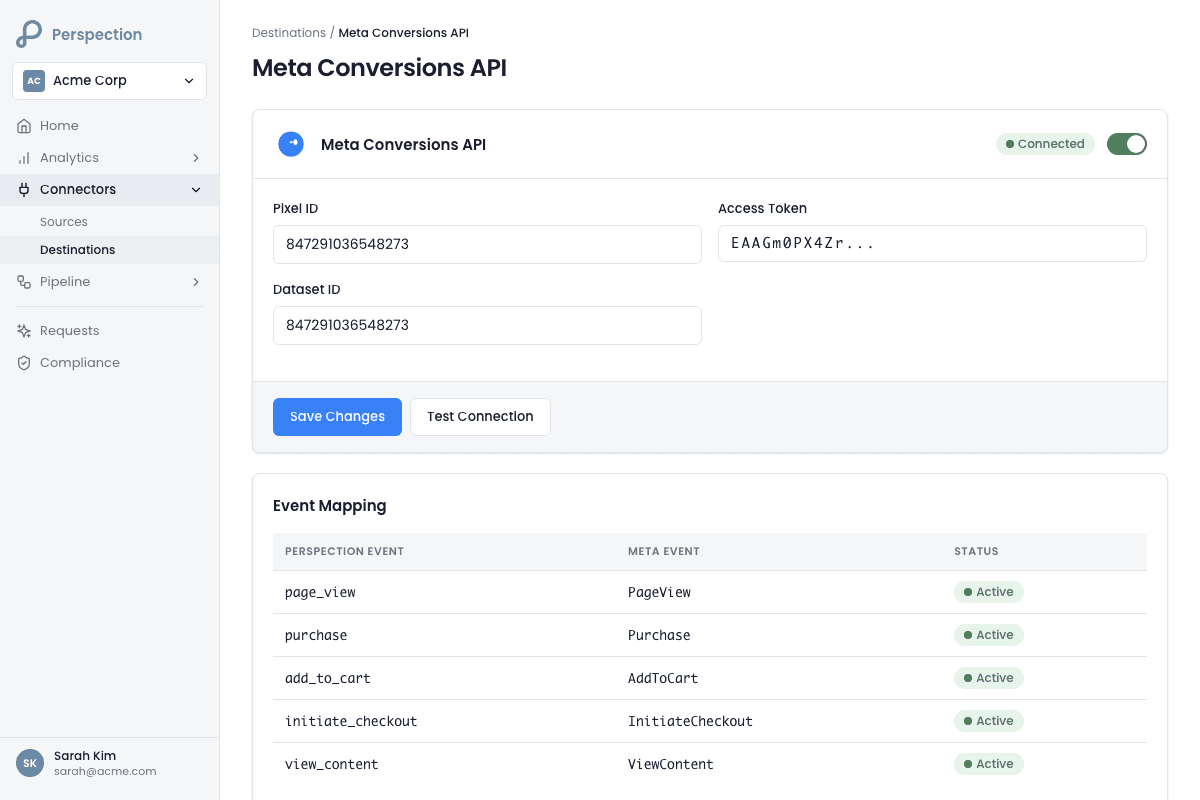
To connect Perspection to Meta CAPI, open the Perspection dashboard, navigate to Connectors then Destinations, and select Meta (Facebook). Enter the Pixel ID from Meta Events Manager Data Sources Settings and paste the Access Token from Events Manager Settings Conversions API. Perspection validates the connection by sending a test PageView event to the Meta Graph API v21.0 endpoint.
Step-by-step: Generate Meta CAPI credentials
Open Meta Events Manager and select the correct Business Manager account.
Click Data Sources in the left sidebar and select the Pixel or Dataset associated with the ad account receiving conversions.
Navigate to Settings and copy the Dataset ID (also called the Pixel ID). The Pixel ID follows a 15-digit numeric format, for example
123456789012345.Scroll down to the Conversions API section and click Generate Access Token. Meta generates a long-lived system user token starting with
EAA. Store the Access Token securely -- Meta does not display the Access Token again after the Access Token is generated.When Events Manager prompts for a setup method, select Set up manually. Do not select Datahash, Gateway, or Partner integration.
Step-by-step: Configure the destination in Perspection
Log into the Perspection dashboard and select the workspace that should send events to Meta.
Open Connectors > Destinations from the left navigation.
Under Available Destinations, click the Meta (Facebook) card labeled "Conversions API."
Paste the Pixel ID into the Pixel ID field.
Paste the Access Token into the Access Token field.
(Optional) Enter a Test Event Code such as
TEST12345for validation in Meta Events Manager before going live. Remove the Test Event Code after validation -- a stale Test Event Code silently routes all production events to the Meta Test Events tool instead of counting the events as real conversions.(Optional) Enter a Baseline Pixel ID to compare Perspection-recovered conversions against the existing tracking setup. Perspection uses the Baseline Pixel ID to calculate how many conversions the old pixel missed.
Toggle the Live switch to enabled.
Click Save. Perspection creates the destination and displays a "Live" health badge.
Click Test to send a validation PageView event to the Meta Graph API. Perspection reports the connection test result and latency in milliseconds.
Required and optional fields
Field | Required | Format | Source |
|---|---|---|---|
Pixel ID | Yes | 15-digit numeric ( | Events Manager > Data Sources > Settings |
Access Token | Yes | String starting with | Events Manager > Settings > Conversions API |
Test Event Code | No | Alphanumeric ( | Events Manager > Test Events tab |
Baseline Pixel ID | No | 15-digit numeric | Old pixel for comparison reporting |
What data does Perspection send to Meta CAPI?
Perspection sends every server event to Meta CAPI with the event name, Unix timestamp, action_source set to "website" for browser-originated events, SHA-256-hashed email and phone, Facebook Browser ID (fbp), Facebook Click ID (fbc), client IP address, user agent, external_id, and custom data including value, currency, content_type, content_ids, and order_id for purchase events.
Perspection transforms raw events from the Perspection SDK into the Meta CAPI payload schema before dispatch. The Perspection Meta connector (running on the Perspection dispatch worker) maps each field to the exact parameter name Meta expects:
User data parameters
Perspection Field | Meta CAPI Parameter | Format | Purpose |
|---|---|---|---|
| SHA-256 hash (64 hex chars) | Primary identity matching | |
phone |
| SHA-256 hash (64 hex chars) | Secondary identity matching |
external_id |
| SHA-256 hash or raw string | Cross-device identity stitching |
client_ip_address |
| IPv4/IPv6 string | Geographic and session matching |
client_user_agent |
| Full UA string | Device fingerprinting |
_fbp cookie |
|
| Browser session continuity |
_fbc cookie |
|
| Click-to-conversion attribution |
first_name |
| SHA-256 hash | Enhanced matching |
last_name |
| SHA-256 hash | Enhanced matching |
city |
| SHA-256 hash | Geographic matching |
state |
| SHA-256 hash | Geographic matching |
zip_code |
| SHA-256 hash | Geographic matching |
country |
| SHA-256 hash | Geographic matching |
Event name mapping
Perspection automatically translates common event names to Meta standard events:
Perspection Event | Meta Standard Event |
|---|---|
|
|
|
|
|
|
|
|
|
|
|
|
|
|
|
|
|
|
The Perspection Meta connector automatically skips internal events that have no analytics value for Meta, including identify, session_start, page_hidden, javascript_error, and consent update events. Custom event names that do not match the mapping table pass through to Meta unchanged.
Custom data for purchase events
For purchase events, Perspection automatically structures the custom_data payload:
How does Perspection calculate Meta Event Match Quality?
Perspection calculates a weighted Event Match Quality score from 0 to 100 for every event before dispatching to Meta CAPI. The EMQ score uses six factors: email hash (25%), phone hash (20%), external_id (15%), browser data (15%), address data (15%), and custom data completeness (10%). Scores at 80+ rate "excellent"; scores below 50 trigger critical warnings.
The Perspection Meta connector runs the EMQ calculation inline before every dispatch call. The Perspection EMQ analyzer evaluates 15 individual parameters across two categories:
Hashed PII parameters (weighted by matching value)
Parameter | Field | Weight | Hashing |
|---|---|---|---|
| 2.0 | SHA-256 required | |
Phone |
| 2.0 | SHA-256 required |
First Name |
| 1.0 | SHA-256 required |
Last Name |
| 1.0 | SHA-256 required |
Date of Birth |
| 1.5 | SHA-256 required |
Gender |
| 0.5 | SHA-256 required |
City |
| 0.8 | SHA-256 required |
State |
| 0.8 | SHA-256 required |
Zip Code |
| 1.2 | SHA-256 required |
Country |
| 1.0 | SHA-256 required |
Unhashed identifier parameters
Parameter | Field | Weight |
|---|---|---|
Client IP Address |
| 1.5 |
Client User Agent |
| 1.0 |
Facebook Browser ID |
| 2.0 |
Facebook Click ID |
| 2.5 |
External ID |
| 1.5 |
EMQ rating thresholds
Score Range | Rating | Action |
|---|---|---|
80 - 100 | Excellent | Optimal for Meta attribution |
60 - 79 | Good | Meeting Meta recommended quality |
40 - 59 | Fair | Improvement recommended |
0 - 39 | Poor | Critical: events may not match |
The Perspection dashboard displays a Data Completeness coaching panel that aggregates EMQ analysis across the last 7 days of dispatched events. The coaching panel shows the completeness distribution (excellent/good/fair/poor), identifies the most common missing parameters, and provides prioritized recommendations to increase the EMQ score.
EMQ thresholds by source
Perspection applies different EMQ warning thresholds depending on the event source, because different sources have different data availability:
Source | Warning Threshold | Rationale |
|---|---|---|
Browser SDK | 70 | Full browser data (fbp, fbc, IP, UA) available |
Shopee / Lazada | 65 | Limited browser data from marketplace |
Offline conversions | 50 | No browser context (CSV uploads, COD payments) |
Events below the threshold still dispatch to Meta -- Perspection never silently drops events. The Perspection connector logs a warning with coaching recommendations when the EMQ score falls below the threshold.
What is CPAS and how does Perspection support Collaborative Ads?
CPAS (Collaborative Performance Advertising Solution) is Meta's official partnership program with Shopee and Lazada. CPAS enables product catalog sync from marketplace to Facebook, conversion tracking without strict EMQ requirements, and Dynamic Product Ads from marketplace catalog data. Perspection supports CPAS by relaxing EMQ validation for marketplace events and dispatching catalog-linked conversions to Meta.
Marketplace events from Shopee and Lazada lack browser data because the purchase occurs inside the Shopee or Lazada app, not in a web browser. Without CPAS, Shopee events typically score 39/100 EMQ and Lazada events score 69/100 EMQ -- both below the standard 70 threshold. CPAS solves the low-EMQ problem by linking the marketplace product catalog directly to the Facebook ad account.
How CPAS works with Perspection
The marketplace (Shopee or Lazada) shares the product catalog with the advertiser's Facebook Business Manager.
The advertiser accepts the catalog share and creates a dedicated ad account for CPAS campaigns.
In Perspection, the workspace administrator enables the CPAS toggle for Shopee or Lazada in the Meta destination configuration.
When Perspection receives a marketplace order event, the Perspection Meta connector detects the
source_systemfield (eithershopeeorlazada) and activates CPAS mode.In CPAS mode, Perspection dispatches the event to Meta without blocking on low EMQ scores. Meta uses the shared catalog to attribute the conversion.
CPAS configuration fields
Field | Purpose |
|---|---|
Shopee CPAS enabled | Toggle CPAS mode for Shopee order events |
Shopee Catalog ID | Optional catalog ID for verification |
Lazada CPAS enabled | Toggle CPAS mode for Lazada order events |
Lazada Catalog ID | Optional catalog ID for verification |
CPAS requirements
Dedicated ad account: CPAS requires a separate Facebook ad account. Do not use an existing ad account.
Minimum ad spend: Varies by region, typically $1,000-$5,000 per month.
Approval timeline: 2-3 weeks from application for both Shopee and Lazada.
Eligibility: All marketplace and ShopeeMall sellers (Shopee); no counterfeit products (Lazada).
While waiting for CPAS approval, Perspection still dispatches marketplace events to Meta. The events may have lower match rates without CPAS catalog linking, but Perspection never drops marketplace conversion data.
How does Perspection deduplicate browser and server events?
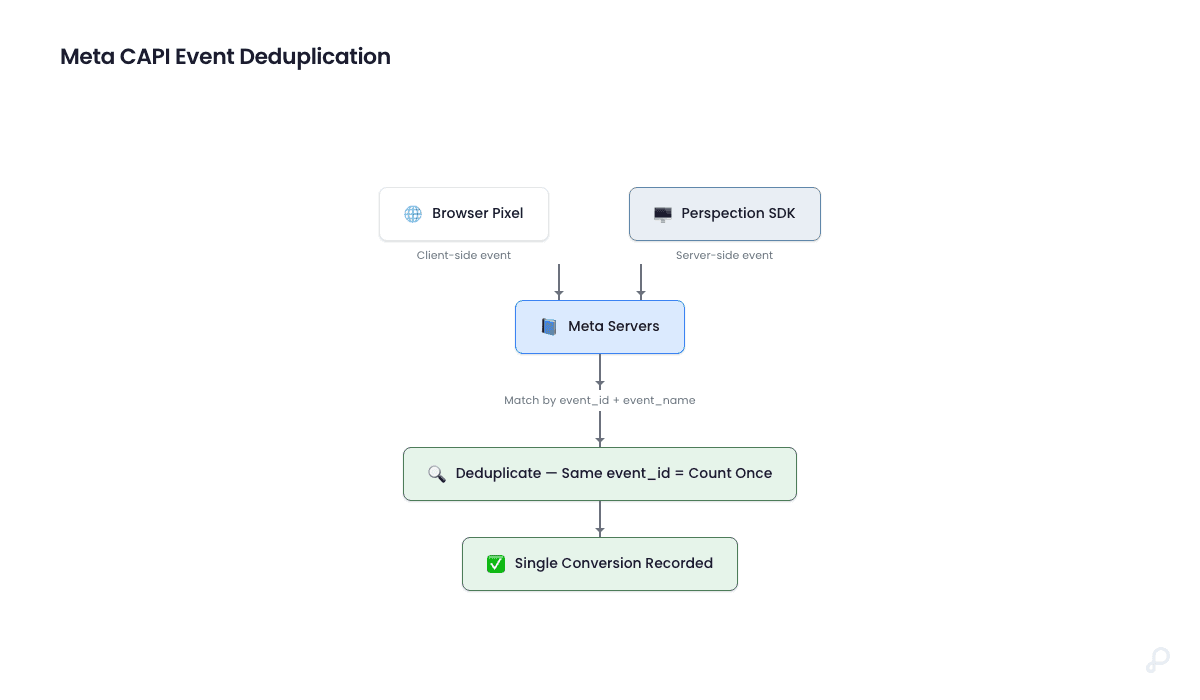
Perspection sends a unique event_id with every server-side event dispatched to Meta CAPI. Meta deduplicates by matching event_id plus event_name against browser pixel events within a 48-hour window. When both browser and server signals carry the same event_id, Meta counts the event exactly once.
The deduplication mechanism
The Perspection SDK generates a unique event_id (UUID v4 format) at the moment the SDK captures each event in the browser. The same event_id is sent in two directions:
Browser path: The Meta Pixel (if installed alongside Perspection) fires the event with the
event_iddirectly to Meta from the browser.Server path: The Perspection SDK sends the event to the Perspection ingestion API, which processes, enriches, and dispatches the event to Meta CAPI with the same
event_id.
Meta receives both signals and matches the signals by event_id + event_name. Meta keeps the server-side event (which contains richer user data from Perspection identity resolution) and discards the duplicate browser event.
Why deduplication matters
Without deduplication, advertisers running both the Meta Pixel and Perspection server-side tracking would see inflated conversion counts. A single purchase would appear as two purchases in Meta Ads Manager, doubling reported ROAS and corrupting campaign optimization signals. The event_id deduplication ensures Meta counts exactly one conversion per actual user action.
Deduplication rules
Scenario | Meta Behavior |
|---|---|
Browser pixel fires, CAPI sends same | Deduplicated: counted once |
Only CAPI sends (pixel blocked by ad blocker) | Counted once from CAPI |
Only pixel fires (CAPI fails) | Counted once from pixel |
Different | Counted twice (misconfiguration) |
How do you verify Meta CAPI events in Events Manager?
To verify Meta CAPI events, enter a Test Event Code into the Perspection Meta destination, trigger a test conversion on the website, then check the Test Events tab in Meta Events Manager. Meta displays each server event with parameters and warnings. Remove the Test Event Code after verification to prevent production events from routing to the test tool.
Step-by-step: Verify with Test Event Code
Open Meta Events Manager and select the correct Pixel / Dataset.
Click the Test Events tab.
Copy the Test Event Code displayed at the top of the Test Events tab (formatted as
TESTfollowed by 5 alphanumeric characters, for exampleTEST12345).In the Perspection dashboard, navigate to Connectors > Destinations and expand the Meta (Facebook) destination card.
Paste the Test Event Code into the Test Event Code field and click Save.
Open the website connected to the Perspection workspace in a separate browser tab.
Perform a tracked action -- for example, view a product page (triggers
ViewContent), add an item to cart (triggersAddToCart), or complete a purchase (triggersPurchase).Return to Meta Events Manager Test Events tab. Within 30 seconds, the test event should appear showing the event name, timestamp, user data parameters (em, ph, fbp, fbc, external_id, client_ip_address, client_user_agent), and custom data.
Verify the event parameters match expectations. Meta highlights any parameters with formatting warnings.
After successful verification, return to the Perspection dashboard and clear the Test Event Code field, then click Save. A stale Test Event Code causes all production events to route to the Test Events tool, preventing the events from counting as real conversions.
Step-by-step: Verify in the Overview tab
In Meta Events Manager, click the Overview tab for the Pixel / Dataset.
Filter by Connection Method > Server to isolate CAPI events.
Check the event volume graph to confirm server-side events are arriving alongside (or replacing) browser pixel events.
Click any individual event type (such as
Purchase) to see the Event Match Quality score Meta has assigned -- Meta calculates Event Match Quality independently using Meta proprietary algorithms, but the Meta EMQ score should correlate with the Perspection EMQ score displayed in the Destination Health dashboard.
Step-by-step: Use the Perspection connection test
In the Perspection dashboard, expand the Meta destination card.
Click the Test button. Perspection sends a minimal PageView event to the Meta Graph API v21.0 endpoint.
Perspection reports the result as "Connection test successful!" with the response latency in milliseconds, or displays the specific Meta API error message if the connection fails.
Common failure causes: expired Access Token, incorrect Pixel ID, insufficient permissions on the system user token, or network connectivity issues.
How does Perspection handle rate limits and retries for Meta CAPI?
The Meta Conversions API enforces 200 requests per second per Pixel ID. Perspection tracks the rate limit counter internally and pauses dispatch when remaining capacity reaches zero, resuming after the window resets. For transient failures (HTTP 5xx, 429), the Perspection Meta connector retries with exponential backoff. Non-retriable errors (HTTP 4xx) route to the Dead Letter Queue.
Rate limiting
The Perspection dispatch worker maintains a per-destination rate limit tracker. When the Meta API returns rate limit headers, the Perspection Meta connector updates the rateLimitRemaining counter and rateLimitResetTime timestamp. If an event dispatch attempt detects zero remaining capacity, the Perspection Meta connector returns a rate limit error and the event is re-queued for dispatch after the reset window.
Retry behavior
HTTP Status | Retriable | Perspection Action |
|---|---|---|
200 | N/A | Success, log EMQ score |
429 (Rate Limited) | Yes | Exponential backoff retry |
500-599 (Server Error) | Yes | Exponential backoff retry |
400-499 (Client Error) | No | Log error, route to DLQ |
Timeout
The Perspection Meta connector enforces a 5-second timeout per API call to the Meta Graph API. If the Meta API does not respond within 5 seconds, the request is aborted and retried.
Privacy compliance
Perspection supports Meta Limited Data Use (LDU) for privacy compliance. When consent fields indicate restricted data processing requirements (ad_storage denied or ad_user_data denied), the Perspection Meta connector automatically applies data_processing_options: ["LDU"] to the Meta event payload.
Methodology
All Meta CAPI configuration steps and event mapping tables in this guide were verified against the Perspection production dashboard and live Meta Events Manager test events as of February 2026.
"The single highest-impact action for improving Meta CAPI attribution is capturing the
_fbccookie -- the Facebook Click ID. The_fbcparameter carries a weight of 2.5 in the EMQ scoring model, the highest of any single parameter. When a user clicks a Facebook ad, the FBCLID appends to the landing page URL and is stored in the_fbccookie. Perspection's first-party domain setup preserves the_fbccookie beyond Safari ITP limits, which is why advertisers using Perspection first-party domains see 20-40% higher attributed conversions compared to standard browser pixel implementations." -- Perspection Engineering Team
How does Perspection map events to Meta CAPI parameters?
Perspection provides a visual and JSON-based event mapping editor that customizes how Perspection events translate to Meta CAPI events. The mapping editor supports event name remapping, property remapping via dot-notation paths, event ignoring to skip specific events, and toggling between drag-and-drop visual mode and raw JSON mode.
Beyond the default event name mapping, Perspection provides a visual and JSON-based event mapping editor for customizing how Perspection events translate to Meta events. The mapping editor supports:
Event name remapping: Map a custom source event name (for example
product_viewed) to a specific Meta event name (for exampleViewContent).Property remapping: Map source properties to destination-specific custom data keys using dot-notation paths (for example
properties.pricemapped tovalue).Event ignoring: Mark specific source events to skip dispatch to Meta entirely.
Visual and JSON modes: Toggle between a drag-and-drop visual editor and a raw JSON editor for advanced configurations.
To configure event mapping, expand the Meta destination card in the Perspection dashboard, scroll to the Event Mapping section, and add mapping rules. Save the mapping configuration separately from the destination credentials.
Sources & References
Meta for Developers, "Conversions API - Get Started," https://developers.facebook.com/docs/marketing-api/conversions-api/get-started
Meta for Developers, "Conversions API - Parameters," https://developers.facebook.com/docs/marketing-api/conversions-api/parameters
Meta for Developers, "Conversions API - Deduplicate Events," https://developers.facebook.com/docs/marketing-api/conversions-api/deduplicate-pixel-and-server-events
Meta for Developers, "Event Match Quality - Best Practices," https://developers.facebook.com/docs/marketing-api/conversions-api/best-practices
Meta for Business, "Collaborative Performance Advertising Solution (CPAS)," https://www.facebook.com/business/cpas
Apple Developer Documentation, "App Tracking Transparency," https://developer.apple.com/documentation/apptrackingtransparency
WebKit, "Intelligent Tracking Prevention," https://webkit.org/tracking-prevention/
Perspection Product Guide, "Event Match Quality Coaching," /library/event-match-quality-guide
Perspection Product Guide, "Destination Health Monitoring," /library/destination-health-failed-events-guide
Perspection Product Guide, "First-Party Domain Setup," /library/first-party-tracking-domain-guide