Event Match Quality: Improve Your EMQ Score with Perspection
Improve Event Match Quality EMQ Score | Perspection
Learn how Perspection calculates Event Match Quality scores 0-100, tracks 9 identity parameters, and helps improve EMQ for Meta CAPI, Google, TikTok.
Event Match Quality (EMQ) measures how effectively server-side event data matches to user profiles on advertising platforms such as Meta, Google Ads, and TikTok. Perspection calculates an EMQ score from 0 to 100 by evaluating the presence and quality of 15 identity parameters across two groups: Hashed PII (email, phone, name, date of birth, gender, city, state, zip code, country) and Unhashed Identifiers (client IP, user agent, FBP cookie, FBC cookie, external ID). Each parameter carries a specific weight reflecting the parameter's value for ad-platform identity matching. Perspection also provides an Identifier Coverage Card on the Home Dashboard that tracks 9 key identifiers across 4 sections -- PII, Meta/Facebook, Click IDs, and Other IDs -- with color-coded progress bars (green at 70% or above, yellow at 40% or above, red below 40%) and a weighted data completeness score. Together, the EMQ coaching panel and the Identifier Coverage Card give advertisers the precise diagnostics needed to maximize conversion attribution, reduce cost per acquisition, and close the gap between ad spend and measurable return.
What is Event Match Quality and why does EMQ matter for ad performance?
Event Match Quality determines how successfully Perspection server-side events link back to real user profiles on advertising platforms like Meta, Google Ads, and TikTok. Higher EMQ scores translate into more accurate conversion attribution, lowering cost per acquisition by ensuring advertising algorithms receive complete feedback loops. EMQ scores below 60 mean 30-40% of conversions go unattributed.
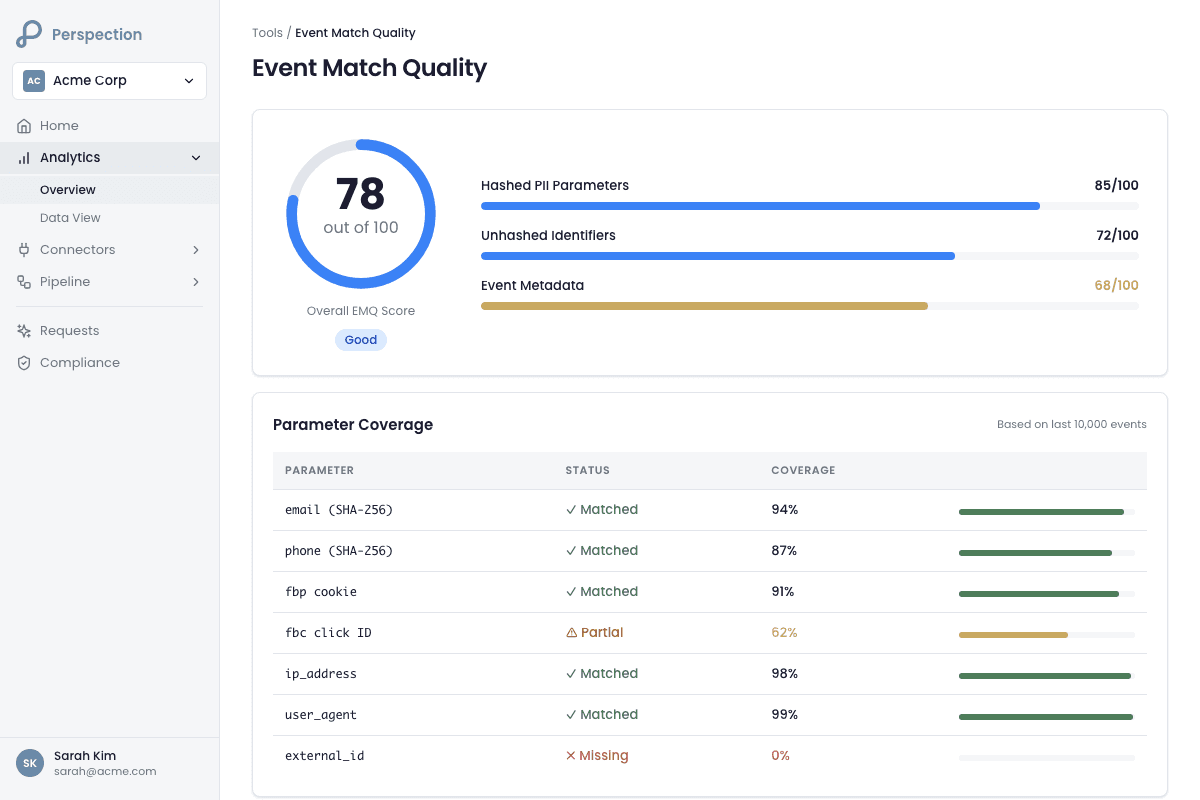
Advertising platforms rely on identity signals -- email addresses, phone numbers, browser cookies, and click IDs -- to connect a server-side conversion event back to the ad impression or click that generated the conversion. Without these identity signals, the advertising platform treats the conversion as organic or unattributable, which degrades campaign optimization.
The impact of the EMQ score cascades across three areas:
Attribution accuracy -- A Perspection EMQ score of 80 or above means the advertising platform can match the vast majority of conversion events to known users, which gives the platform's machine-learning algorithm accurate training data for audience targeting and bid optimization.
Cost per acquisition (CPA) -- When the advertising platform receives high-quality identity signals, the platform's optimization algorithm converges faster on high-value audiences, reducing wasted spend on users unlikely to convert.
Return on ad spend (ROAS) reporting -- Unattributed conversions create a gap between actual revenue and reported ROAS. A higher EMQ score closes the attribution gap, giving marketing teams accurate ROAS numbers for budget allocation decisions.
Meta Conversions API (CAPI), Google Ads Enhanced Conversions, and TikTok Events API all use server-side identity signals for attribution. Perspection sends events to these platforms through server-side Conversions API connections described in Guide 5: Meta Conversions API (CAPI). The EMQ score directly reflects how well Perspection has prepared each event for the advertising platform's identity-matching system.
How does Perspection calculate the EMQ score?
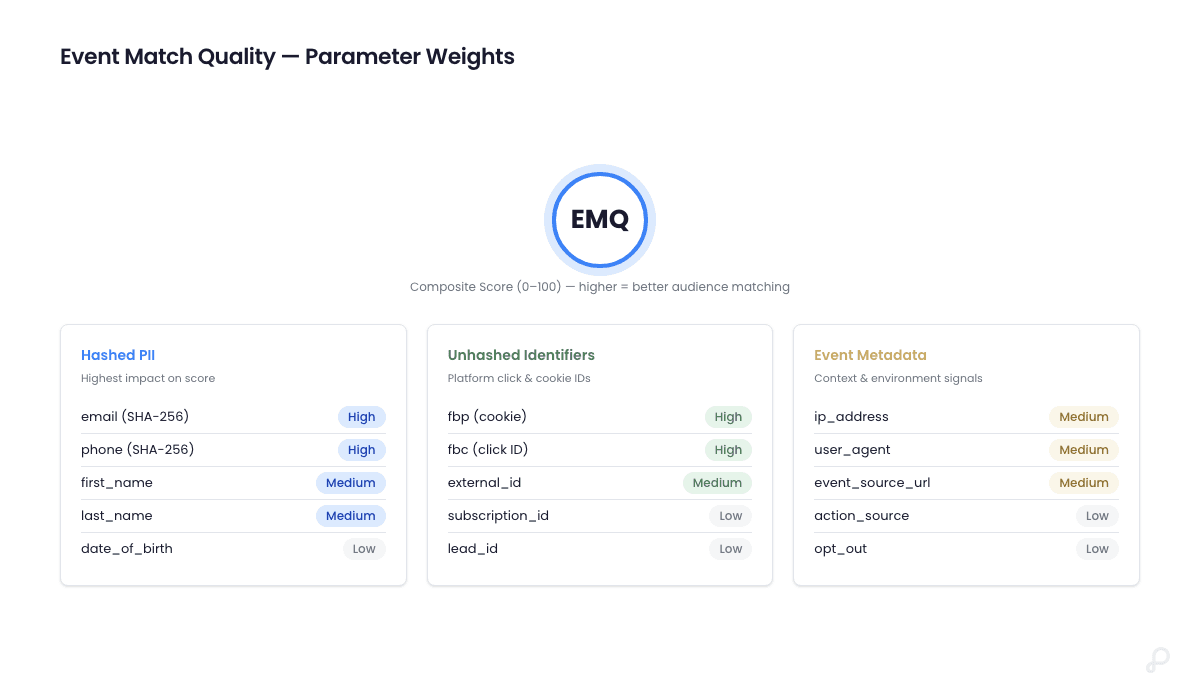
Perspection calculates the EMQ score on a 0-to-100 scale using a weighted formula across 15 identity parameters in two groups: Hashed PII (email, phone, name, date of birth, gender, city, state, zip, country) and Unhashed Identifiers (client IP, user agent, FBP, FBC, external ID). The score maps to four tiers: poor (below 40), fair (40-60), good (60-80), and excellent (80-100).
EMQ parameter weights
Perspection assigns the following weights to each identity parameter based on the parameter's value for advertising-platform identity matching:
Hashed PII parameters:
Parameter | Field | Weight | Hashing Required |
|---|---|---|---|
| 2.0 | Yes (SHA-256) | |
Phone |
| 2.0 | Yes (SHA-256) |
First Name |
| 1.0 | Yes (SHA-256) |
Last Name |
| 1.0 | Yes (SHA-256) |
Date of Birth |
| 1.5 | Yes (SHA-256) |
Gender |
| 0.5 | Yes (SHA-256) |
City |
| 0.8 | Yes (SHA-256) |
State |
| 0.8 | Yes (SHA-256) |
Zip Code |
| 1.2 | Yes (SHA-256) |
Country |
| 1.0 | Yes (SHA-256) |
Unhashed Identifier parameters:
Parameter | Field | Weight | Hashing Required |
|---|---|---|---|
Client IP Address |
| 1.5 | No |
Client User Agent |
| 1.0 | No |
Facebook Browser ID (FBP) |
| 2.0 | No |
Facebook Click ID (FBC) |
| 2.5 | No |
External ID |
| 1.5 | No |
The total possible weight across all 15 parameters is 19.3. The maximum EMQ score of 100 requires all 15 parameters to be present and, for the Hashed PII group, properly SHA-256 hashed.
Hashing credit logic
Perspection applies a partial-credit system for Hashed PII parameters:
Parameter present and properly SHA-256 hashed -- Perspection awards 100% of the parameter's weight.
Parameter present but not hashed -- Perspection awards 30% of the parameter's weight, reflecting the reduced matching value of unhashed PII.
Parameter missing -- Perspection awards 0% of the parameter's weight.
Perspection validates SHA-256 hashing by checking whether the value is exactly 64 hexadecimal characters. The Perspection SDK performs client-side SHA-256 hashing automatically for email and phone fields detected in form submissions, which means advertisers using the Perspection SDK receive full credit for hashed PII without additional engineering work.
EMQ rating tiers
Rating | Score Range | Completeness | Interpretation |
|---|---|---|---|
Excellent | 80 - 100 | 80-100% | Optimal data quality for ad-platform matching |
Good | 60 - 79 | 60-79% | Strong matching; minor improvements possible |
Fair | 40 - 59 | 40-59% | Moderate matching; adding identifiers will improve performance |
Poor | 0 - 39 | 0-39% | Low matching; focus on capturing email, phone, and Facebook IDs |
Batch analysis
Perspection does not just score individual events. Perspection analyzes the most recent 100 Meta CAPI events from the last 7 days and produces a batch analysis that includes:
Average completeness percentage across all analyzed events.
Score distribution showing the count and percentage of events in each rating tier (excellent, good, fair, poor).
Common missing data patterns ranked by frequency, showing which parameters are missing most often across the event batch.
Top improvement recommendations prioritized by impact, generated from the aggregate analysis.
What parameters does Perspection track for EMQ?
Perspection tracks two identity parameter groups. The Hashed PII group contains 10 parameters -- email, phone, first name, last name, date of birth, gender, city, state, zip code, and country -- all requiring SHA-256 hashing. The Unhashed Identifiers group contains 5 parameters -- client IP, user agent, FBP, FBC, and external ID -- transmitted in original form.
Hashed PII parameters
The Hashed PII group represents personally identifiable information that advertising platforms use for deterministic identity matching. Perspection evaluates each Hashed PII parameter on three criteria:
Presence -- Whether the parameter exists in the event payload.
Hashing status -- Whether the value has been properly SHA-256 hashed (validated as a 64-character hexadecimal string).
Weight contribution -- How much the parameter contributes to the overall EMQ score.
Email (em) and phone (ph) carry the highest weight at 2.0 each because email and phone are the most reliable deterministic identifiers for cross-platform user matching. The Perspection SDK automatically detects email and phone fields in HTML forms and applies SHA-256 hashing before the data leaves the browser, ensuring privacy compliance and full EMQ credit.
Unhashed Identifier parameters
The Unhashed Identifiers group represents browser-level and platform-level identity signals:
Facebook Browser ID (FBP) -- The
_fbpfirst-party cookie set by the Meta Pixel or Perspection SDK, carrying a weight of 2.0. FBP enables Meta to match server-side events to browser sessions.Facebook Click ID (FBC) -- The
fbcparameter derived from thefbclidURL parameter when a user clicks a Meta ad, carrying the highest weight in the Unhashed group at 2.5. FBC is the strongest signal for Meta ad attribution.Client IP Address -- The IP address captured from the HTTP request, carrying a weight of 1.5. Perspection automatically extracts the client IP from request headers during server-side event processing.
Client User Agent -- The browser user agent string, carrying a weight of 1.0. Perspection captures the user agent automatically during ingestion.
External ID -- A persistent user identifier (such as a customer ID or account number) passed through the Perspection
identify()call, carrying a weight of 1.5.
Actionable recommendations per parameter
When a parameter is missing, Perspection generates a priority-ranked recommendation. The recommendation engine categorizes guidance into four levels:
Critical -- Both email and phone are missing. Perspection flags the missing email and phone combination as the highest-priority fix because email and phone together account for 4.0 out of 19.3 total weight (20.7% of the maximum EMQ score).
High priority -- Email is missing but phone is present, or vice versa.
Important -- FBC or client IP is missing. The FBC cookie alone accounts for 2.5 weight (13% of the maximum score).
Recommended -- FBP, customer name fields, location data, user agent, or country code are missing.
How do you check identifier coverage in the Perspection dashboard?
The Identifier Coverage Card on the Home Dashboard displays an overall data completeness score (0-100%), calculated as a weighted average of 9 identifiers: email hash, phone hash, FBP cookie, FBC cookie, and the top-performing click ID. The card groups identifiers into 4 sections with color-coded progress bars: green at 70%+, yellow at 40-69%, and red below 40%.
Navigating to the Identifier Coverage Card
Log in to the Perspection dashboard at
dashboard.perspection.app.The Home Dashboard loads automatically, showing the Identifier Coverage Card in the main dashboard view. For a complete overview of all Home Dashboard components, see Guide 14: Home Dashboard.
The Identifier Coverage Card auto-refreshes every 30 seconds, pulling the latest coverage data from the last 7 days of processed events.
Understanding the 4 identifier sections
PII (Email/Phone):
Identifier | Label | What Perspection measures |
|---|---|---|
| Email Hash | Percentage of events containing a SHA-256 hashed email address |
| Phone Hash | Percentage of events containing a SHA-256 hashed phone number |
Meta/Facebook:
Identifier | Label | What Perspection measures |
|---|---|---|
| FBC (Click Cookie) | Percentage of events containing the Facebook Click ID cookie |
| FBP (Browser Cookie) | Percentage of events containing the Facebook Browser ID cookie |
| Meta Ads (fbclid) | Percentage of events containing the Meta Ads click parameter |
Click IDs:
Identifier | Label | What Perspection measures |
|---|---|---|
| Google Ads (gclid) | Percentage of events containing the Google Ads click ID |
| TikTok Ads (ttclid) | Percentage of events containing the TikTok click ID |
| Microsoft Ads (msclkid) | Percentage of events containing the Microsoft Ads click ID |
Other IDs:
Identifier | Label | What Perspection measures |
|---|---|---|
| External ID (user_id) | Percentage of events containing a persistent user identifier |
Reading the color-coded progress bars
Each identifier displays a horizontal progress bar with a percentage value and a status label:
Green (70% or above) -- Status: "Great." The identifier coverage for the measured identifier meets the recommended threshold for strong ad-platform matching.
Yellow (40% to 69%) -- Status: "Good." The identifier coverage for the measured identifier is acceptable but has room for improvement.
Red (below 40%) -- Status: "Needs Work." The identifier coverage for the measured identifier is too low for reliable ad-platform matching and requires attention.
Data completeness score formula
Perspection calculates the overall data completeness score using a weighted average:
The "highest click ID coverage" takes the maximum coverage percentage among GCLID, FBCLID, and TTCLID, reflecting that most advertisers concentrate spend on one or two primary advertising platforms rather than all three simultaneously.
Cross-referencing with Meta Events Manager
The Identifier Coverage Card includes a direct link to Meta Events Manager (business.facebook.com/events_manager2), enabling advertisers to cross-reference Perspection's data completeness metrics with Meta's own Event Match Quality reporting. Perspection's scores reflect identifier presence in the data that Perspection sends. Meta calculates Event Match Quality using Meta's own proprietary algorithm, which may weigh parameters differently.
How do you improve a low Perspection EMQ score?
Improving a low EMQ score requires addressing missing parameters in the EMQ coaching panel, starting with highest-weighted parameters. Five impactful actions are: deploying a first-party tracking domain for FBC/FBP cookies, adding Perspection SDK identify() calls for email and phone, preserving click IDs in landing page URLs, loading Perspection SDK before ad-platform pixels, and auditing consent configurations.
Step-by-step: Fix the highest-impact parameters first
1. Set up a first-party tracking domain
A first-party tracking domain routes the Perspection SDK script file and all event data through a subdomain of the advertiser's own domain (such as events.yourdomain.com). First-party domain configuration prevents third-party cookie blocking by Safari ITP, Firefox ETP, and Brave, which directly increases FBC and FBP cookie capture rates.
Navigate to the Perspection dashboard workspace settings.
Follow the DNS verification process described in Guide 24: First-Party Tracking Domain.
After DNS verification completes, Perspection regenerates the SDK snippet to route through the first-party domain.
Re-install the updated SDK snippet on the website.
Expected impact: FBP cookie coverage typically increases from 40-60% to 85-95% after first-party domain activation, because the _fbp cookie persists as a first-party cookie with a full 7-day or longer lifespan instead of being capped at 7 days or blocked entirely by browser privacy features.
2. Implement Perspection SDK identify() calls
The Perspection SDK identify() method passes user identity data -- email, phone, and external ID -- to Perspection for server-side processing. The SDK automatically SHA-256 hashes PII fields before transmitting the data.
Identify the key moments in the user journey where identity data becomes available: login, registration, checkout, newsletter sign-up, account page.
Add the
identify()call at each identified moment:
The Perspection SDK automatically hashes the email and phone values with SHA-256 before transmission.
Perspection stores the identity data and attaches the hashed values to all subsequent events for the identified user's session.
Expected impact: Email coverage typically increases from 10-20% (anonymous browsing only) to 50-70% (post-identification), depending on the percentage of site visitors who log in or provide contact information.
3. Preserve click ID parameters in landing page URLs
Advertising platforms append click ID parameters to landing page URLs when users click ads. Common click IDs include gclid (Google Ads), fbclid (Meta Ads), ttclid (TikTok Ads), and msclkid (Microsoft Ads). The Perspection SDK extracts these parameters from the URL automatically, but the click ID parameters must survive the full URL redirect chain.
Verify that landing page redirects (HTTP 301/302) preserve URL query parameters. Many URL shorteners and redirect services strip query parameters.
Verify that single-page application (SPA) routers do not discard query parameters during client-side navigation.
Verify that tag management systems (Google Tag Manager, Adobe Launch) do not fire page loads before the Perspection SDK initializes.
Enable auto-tagging in Google Ads Manager and verify that the GCLID auto-tagging setting is active.
Enable URL parameters in Meta Ads Manager campaign settings to ensure FBCLID is appended to ad destination URLs.
Expected impact: Click ID coverage improvements vary by advertising spend mix, but properly preserved click IDs typically increase the combined click ID coverage from 15-25% to 40-60% of events originating from paid advertising campaigns.
4. Load the Perspection SDK before ad-platform pixels
The Perspection SDK must initialize before Meta Pixel, Google Analytics, and TikTok Pixel to capture browser cookies (FBP, FBC) and click IDs on the first page load. If ad-platform pixels fire first, the Perspection SDK may miss the initial cookie values.
Place the Perspection SDK snippet as the first script in the
<head>section of the website HTML, before Meta Pixel, Google tag (gtag.js), and TikTok Pixel scripts.If using Google Tag Manager, set the Perspection SDK tag priority to fire before other tags, or use a Custom HTML tag with a high firing priority.
Verify the load order using browser developer tools (Network tab) to confirm the Perspection SDK script loads before other tracking scripts.
5. Verify consent enforcement is not blocking PII collection for opted-in users
Perspection supports consent enforcement through consent mode configuration. Misconfigured consent settings can block PII collection even for users who have explicitly opted in.
Open the Perspection dashboard and navigate to the workspace compliance settings.
Verify that the consent mode configuration correctly distinguishes between opted-in and opted-out users.
For opted-in users, verify that the Perspection SDK is permitted to collect and transmit hashed PII (email, phone) and browser cookies (FBP, FBC).
Test the consent flow by opting in on the website and verifying that subsequent events in the Perspection dashboard contain hashed PII values.
Quick-reference priority matrix
Priority | Action | Parameters Improved | Typical EMQ Lift |
|---|---|---|---|
1 | Set up first-party domain | FBC, FBP | +1.0 to +2.0 points |
2 | Add | Email, Phone, External ID | +1.5 to +3.0 points |
3 | Preserve click IDs in URLs | GCLID, FBCLID, TTCLID, MSCLKID | +0.5 to +1.5 points |
4 | SDK load order optimization | FBP, FBC, all click IDs | +0.5 to +1.0 points |
5 | Consent configuration audit | All PII parameters | Variable |
Methodology
All EMQ scoring parameters and identifier coverage metrics in this guide were verified against the Perspection production dashboard at dashboard.perspection.app as of February 2026.
"The single highest-leverage action for improving Event Match Quality is configuring a first-party tracking domain. Browser privacy restrictions from Safari ITP and Firefox ETP cap third-party cookie lifetimes at 7 days or block third-party cookies entirely. When Perspection routes through a first-party subdomain, the FBP and FBC cookies persist as first-party cookies, which immediately lifts both the per-event EMQ score and the aggregate identifier coverage metrics. Advertisers who activate a first-party domain before optimizing any other parameter typically see the largest one-step improvement in their EMQ rating."
Sources and References
Meta Conversions API documentation: Meta for Developers -- Conversions API
Meta Event Match Quality guide: Meta Business Help Center -- About Event Match Quality
Google Ads Enhanced Conversions: Google Ads Help -- Enhanced Conversions
TikTok Events API: TikTok for Business -- Events API
Safari Intelligent Tracking Prevention (ITP): WebKit -- Tracking Prevention Policy
Perspection Meta CAPI Setup: Guide 5: Meta Conversions API (CAPI)
Perspection First-Party Domain: Guide 24: First-Party Tracking Domain
Perspection Home Dashboard: Guide 14: Home Dashboard