Perspection Data Quality Contracts: How to Enforce JSON Schema Validation on Every Event
Perspection Data Quality JSON Schema Validation
Perspection data quality contracts use JSON Schema to validate events in Warn or Strict mode, monitor violations, and measure coverage.
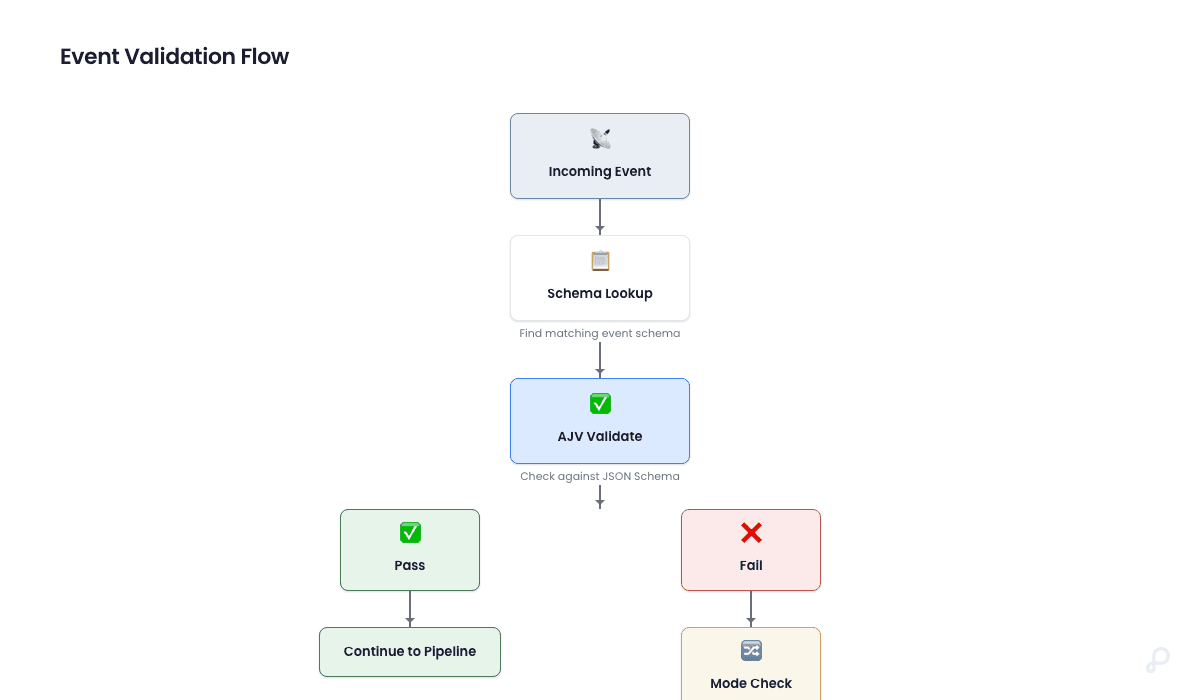
Perspection data quality contracts are JSON Schema definitions that validate incoming event payloads at Stage 1.5 of the processing pipeline -- after ingestion but before deduplication, identity resolution, and destination dispatch. Each data quality contract targets a specific event type (such as purchase or page_view) or a wildcard (*) for all event types. Perspection enforces contracts in one of three validation modes: Off (no validation), Warn (log violations but pass events through), or Strict (block non-conforming events entirely). The Perspection dashboard provides a three-tab Data Quality interface under Pipeline > Data Quality -- Schemas for contract management, Violations for paginated inspection of failures, and Coverage for aggregate metrics on schema adoption and enforcement posture. Data quality contracts use the AJV (Another JSON Validator) library with a bounded in-memory cache of up to 200 compiled schemas per processing worker, ensuring sub-5ms validation overhead per event.
What are Perspection data quality contracts?
Perspection data quality contracts are tenant-scoped JSON Schema definitions binding a schema body to a specific event type and validation mode (Off, Warn, or Strict). On receiving an event, the processing worker checks the schema registry for a matching contract, validates the properties object using AJV, and either logs violations or blocks the event.
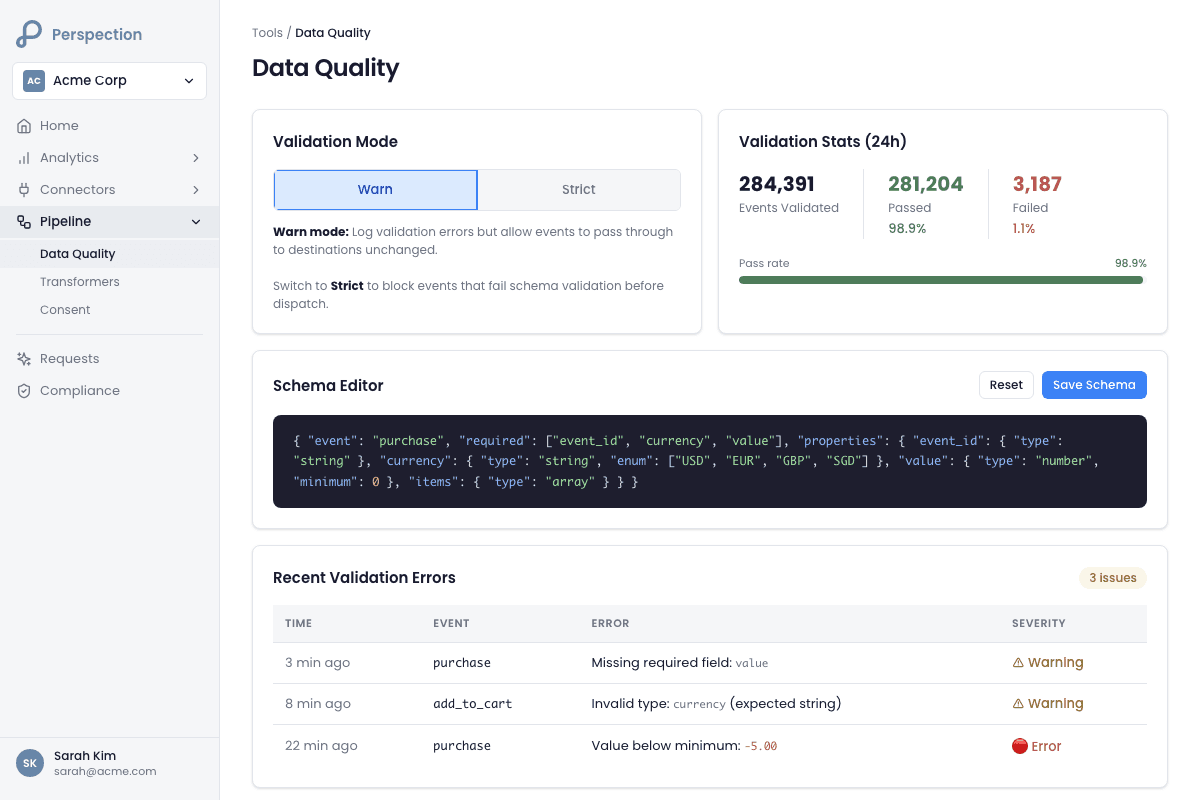
Data quality contracts solve a fundamental problem in customer data infrastructure: data drift. As websites evolve, marketing teams add new tracking calls, and developers modify event payloads, the shape of event data changes without warning. A purchase event that once carried order_id, value, and currency might start arriving without currency -- silently degrading conversion reporting in Meta CAPI, Google Ads, and TikTok Events API.
Perspection data quality contracts catch these regressions at the pipeline level, before corrupted events reach advertising destinations. The contract enforcement system operates at three levels:
Schema definition -- Teams write JSON Schema contracts defining required fields, field types, string patterns, numeric ranges, and structural constraints for each event type.
Pipeline validation -- The Perspection processing worker validates every event against the matching contract at Stage 1.5 of the pipeline, between ingestion and deduplication.
Violation telemetry -- Failed validations are recorded in the
events.schema_violationstable with the specific field path, error message, and AJV keyword that triggered the failure.
Each data quality contract carries a schema_version integer that auto-increments when a team creates a new contract for the same event type. The Perspection schema registry automatically deactivates previous versions of a contract when a new version is saved, ensuring only one active contract exists per event type per tenant at any given time.
Perspection also supports wildcard contracts. Setting the event type to * applies the JSON Schema contract to all event types that do not have a dedicated contract. The processing worker resolves contracts with exact-match priority: a purchase-specific contract takes precedence over a * wildcard contract.
Data quality contracts work in tandem with Event Transformers, which reshape event payloads before destination dispatch. Where Event Transformers modify event structure, data quality contracts verify event structure. Together, the two features give teams full control over what events look like and whether events meet minimum quality standards before reaching platforms like Meta or Google.
How do you create a JSON Schema contract in Perspection?
Navigate to Pipeline > Data Quality > Schemas tab, click "Add Schema," enter an event type (e.g., purchase, page_view, or * for all), select a validation mode (Off, Warn, or Strict), paste a JSON Schema body defining required fields and constraints, and click "Create Schema." Perspection auto-increments schema version and deactivates previous contracts for that event type.
Step-by-step: Create a data quality contract
Log into the Perspection dashboard and select the workspace that should enforce schema validation.
Open Pipeline > Data Quality from the left navigation. The Data Quality page displays the breadcrumb path: Workspace Name > Pipeline > Data Quality.
Click the Schemas tab (the first tab, marked with a shield icon).
Click the "Add Schema" button in the top-right corner of the Schemas tab. The Add Event Schema dialog opens.
In the Event Type field, enter the event name to validate. Examples include
purchase,page_view,add_to_cart, or*(asterisk) to apply the contract to all event types without a dedicated contract.In the Validation Mode dropdown, select one of three modes:
Warn (default) -- The Perspection processing worker logs violations but allows events to proceed through the pipeline to destinations.
Strict -- The Perspection processing worker rejects events that fail validation. Rejected events do not reach deduplication, identity resolution, or destination dispatch.
Off -- The Perspection processing worker skips validation entirely. The Off mode is useful for temporarily disabling a contract without deleting the contract.
In the JSON Schema text area, write or paste a valid JSON Schema body. The default template is:
Click "Create Schema." The Perspection API sends a
POSTrequest to/api/v1/tenants/{tenantId}/schemaswith the event type, validation mode, and JSON Schema body.
JSON Schema contract example: validating purchase events
The following JSON Schema contract ensures every purchase event carries the required fields for accurate conversion tracking and Event Match Quality scoring:
The Perspection processing worker validates the event's properties object -- not the top-level event envelope -- against the JSON Schema contract. Fields like tenant_id, event_id, and timestamp exist on the event envelope and are not subject to data quality contract validation.
Schema versioning behavior
When a team saves a new contract for an event type that already has an active contract, the Perspection schema registry performs two operations inside a database transaction:
The schema registry deactivates the previous active contract by setting
is_active = falseon all existing rows matching the tenant and event type.The schema registry inserts the new contract with
schema_versionset to the previous maximum version plus one.
The version number appears in the Schemas tab table as "v1," "v2," "v3," and so on. Deactivating (deleting) a contract through the dashboard does not decrement the version counter; the next contract created for the same event type will continue the version sequence.
What is the difference between Warn and Strict validation modes?
Warn mode logs violations without blocking events -- failed events still proceed through the full pipeline and reach destinations. Strict mode blocks non-conforming events at Stage 1.5, rejecting them before any downstream processing. Off mode disables validation entirely. Start with Warn to discover data quality issues, then graduate to Strict once schemas are stable and violations approach zero.
Validation mode comparison
Behavior | Off | Warn | Strict |
|---|---|---|---|
Schema compiled and cached | No | Yes | Yes |
Event properties validated | No | Yes | Yes |
Violations recorded in database | No | Yes | Yes |
Event proceeds through pipeline | Yes | Yes | No (rejected) |
Violation visible in Violations tab | No | Yes | Yes |
Dashboard badge color | Green | Amber | Red |
How Warn mode works in the processing pipeline
When the Perspection processing worker encounters an event that matches a contract in Warn mode, the processing worker runs the compiled AJV validator against the event's properties object. If validation fails, the processing worker performs two actions:
The processing worker records the violation in
events.schema_violationsusing a fire-and-forget database insert (the insert is non-blocking to avoid adding latency to the event processing hot path).The processing worker logs a structured warning with the tenant ID, event ID, event type, and violation count.
The event then continues to Stage 2 (Deduplication) and all subsequent pipeline stages. Advertising destinations receive the event regardless of Warn mode violations.
How Strict mode works in the processing pipeline
When the Perspection processing worker encounters an event that matches a contract in Strict mode, the processing worker runs the same AJV validation. If validation fails, the processing worker performs three actions:
The processing worker records the violation in
events.schema_violations(same fire-and-forget insert as Warn mode).The processing worker throws an error with the message: "Schema validation failed for {event_type}: {violation messages}."
The thrown error halts the event's progression through the pipeline. The event does not reach deduplication, identity resolution, enrichment, or destination dispatch.
Strict mode is the only validation mode that can cause event loss. Teams should only enable Strict mode after running a contract in Warn mode long enough to confirm the violation rate is acceptable.
Recommended graduation workflow
Week 1-2: Deploy in Warn mode. Create the data quality contract with Warn validation. Monitor the Violations tab daily. Identify whether violations come from legitimate edge cases (e.g., mobile app events missing optional fields) or genuine data regressions (e.g., a developer removed the
currencyfield).Week 3: Refine the schema. Adjust required fields, add
additionalProperties: trueto allow flexible payloads, or loosen type constraints where needed. Each refinement creates a new schema version.Week 4: Graduate to Strict mode. Once the daily violation count drops to near zero, switch the contract from Warn to Strict. Monitor the Home Dashboard for any sudden drops in event volume that might indicate Strict mode is rejecting legitimate events.
Ongoing: Monitor Coverage tab. Track the ratio of Strict mode contracts to total contracts. A mature data quality practice aims for 80% or more of active contracts running in Strict mode.
How do you monitor schema violations in Perspection?
Navigate to Pipeline > Data Quality > Violations tab. The tab displays a paginated table with four columns: violation timestamp, event type badge, field path (e.g., /value or /currency), and error message describing expected versus actual values. Pagination shows 20 violations per page with navigation buttons and an aggregate violation count header.
Reading the Violations table
Each row in the Violations table represents one event that failed schema validation. The table columns provide the following information:
Time -- The
created_attimestamp of the violation record, formatted as a locale-aware date-time string (e.g., "2/27/2026, 3:14:22 PM"). The timestamp reflects when the Perspection processing worker recorded the violation, not when the original event was ingested.Event Type -- The event name that triggered the violation, displayed inside a monospace code badge (e.g.,
purchase,add_to_cart). The event type links the violation back to the data quality contract in the Schemas tab.Field -- The JSON instance path of the field that failed validation. The field path uses JSON Pointer notation from the AJV library:
/valuemeans thevalueproperty at the root of the properties object,/items/0/product_idmeans theproduct_idfield inside the first element of anitemsarray. When the violation occurs at the root level (e.g., a missing required field), the Field column displays/.Error -- The AJV error message describing the validation failure. Common error messages include:
must have required property 'currency'-- A required field is missing from the event properties.must be number-- A field that should be a number arrived as a string or other type.must match pattern "^[A-Z]{3}$"-- A string field did not match the expected regular expression pattern.must NOT have fewer than 1 characters-- A string field arrived as an empty string whenminLength: 1was specified.
When a single event triggers multiple violations (e.g., missing both value and currency), the Violations table displays the first violation in the Error column and appends a "+N more" indicator (e.g., "+1 more") showing how many additional violations the event triggered.
Filtering and pagination
The Violations tab supports the following navigation controls:
Total count header -- Displays the total number of violations (e.g., "247 total violations") at the top of the tab.
Page indicator -- Shows the current page position (e.g., "Page 3 of 13") at the bottom of the table.
Previous page button -- Navigates to the previous page. The button is disabled on page 1.
Next page button -- Navigates to the next page. The button is disabled on the last page.
API-level filtering -- The violations API endpoint (
/api/v1/tenants/{tenantId}/schemas/violations) accepts an optionalevent_typequery parameter for server-side filtering by event type.
Investigating a violation
When a violation appears in the Violations table, follow the investigation workflow:
Identify the event type. Check whether the violated event type has a dedicated contract or is matched by a wildcard
*contract.Read the field path. The field path tells exactly which property failed. A path of
/currencymeans thecurrencyfield inside the event'spropertiesobject.Read the error message. The error message tells what the JSON Schema expected versus what the event delivered.
Decide the response. If the violation represents a genuine data regression, fix the source (SDK implementation, tag manager, or server-side tracking). If the violation represents an expected edge case, update the JSON Schema contract to accommodate the variation.
How do you measure data quality coverage in Perspection?
The Coverage tab displays three summary cards -- Active Schemas (event types with contracts), Total Violations (aggregate failures across all contracts), and Strict Mode (contracts blocking invalid events). Below the cards, a Validation Mode Distribution bar chart shows the percentage of active contracts in each mode (Strict, Warn, Off) as color-coded progress bars.
Summary cards
The Coverage tab renders three metric cards in a responsive three-column grid:
Active Schemas -- Displays the count of contracts where
is_active = true. The card subtitle reads "Event types with validation rules." A workspace with 12 active contracts coveringpurchase,page_view,add_to_cart,initiate_checkout, and 8 other event types would display "12" as the hero number. Tracking the Active Schemas count over time reveals whether the team is expanding data quality contract coverage to new event types.Total Violations -- Displays the aggregate count of all violation records across all event types and all time. The card subtitle reads "Events failing schema validation." The Total Violations count is fetched from the violations API pagination metadata. A rising Total Violations number alongside a stable Active Schemas count indicates degrading data quality in existing event streams. A rising Total Violations number alongside a rising Active Schemas count may simply indicate that new contracts are catching previously invisible issues.
Strict Mode -- Displays the count of active contracts where
validation_mode = 'strict'. The card subtitle reads "Schemas blocking invalid events." The Strict Mode count serves as a maturity indicator: a high ratio of Strict Mode contracts to Active Schemas indicates a mature data quality practice where schemas have been validated through the Warn-to-Strict graduation workflow.
Validation Mode Distribution chart
Below the summary cards, the Coverage tab renders a stacked horizontal bar chart showing the distribution of validation modes across all active contracts. The bar chart displays three rows:
Strict (red bar) -- Percentage and count of contracts in Strict mode.
Warn (amber bar) -- Percentage and count of contracts in Warn mode.
Off (green bar) -- Percentage and count of contracts in Off mode.
Each row shows the mode badge, a proportional progress bar, and a count with percentage (e.g., "4 (33%)"). The Validation Mode Distribution chart renders only when the workspace has at least one active contract.
Coverage benchmarks
Based on data infrastructure best practices, the following benchmarks help teams evaluate data quality contract maturity:
Maturity Level | Active Schemas | Strict Mode Ratio | Weekly Violations |
|---|---|---|---|
Starting | 1-3 event types | 0% | Uncounted |
Developing | 4-8 event types | 10-30% | Declining |
Established | 8-15 event types | 50-70% | Stable, low |
Advanced | 15+ event types (including wildcard) | 80%+ | Near zero |
Teams beginning the data quality contract journey should focus on the three highest-value event types first: purchase (revenue accuracy), page_view (attribution accuracy), and add_to_cart (funnel accuracy). Once contracts for these three event types reach Strict mode with near-zero violations, teams should expand coverage to initiate_checkout, lead, complete_registration, and custom events specific to the business.
How does the Perspection processing pipeline enforce data quality contracts?
The pipeline enforces data quality contracts at Stage 1.5, after ingestion and before deduplication. The processing worker maintains an in-memory cache of up to 200 compiled AJV validators with a 5-minute TTL. On cache miss, it queries the schema registry for an exact-match or wildcard contract, compiles and caches the validator, then validates the event's properties object.
Pipeline stage positioning
The data quality contract validation stage sits at a deliberate position in the Perspection processing pipeline:
Stage 1: Ingestion -- The API server receives the event and publishes the event to the Redis event stream.
Stage 1.5: Schema Contract Validation -- The processing worker validates the event properties against the matching JSON Schema contract.
Stage 2: Deduplication -- The processing worker checks Redis and PostgreSQL for duplicate events.
Stage 3: Identity Resolution -- The processing worker resolves anonymous identifiers to canonical identity profiles.
Stage 4: Enrichment -- The processing worker enriches the event with geo, device, and consent data.
Stage 5: Dispatch -- The processing worker routes the event to configured destinations (Meta CAPI, Google Ads, TikTok, GA4).
Placing schema validation before deduplication ensures that invalid events are caught before the Perspection platform spends resources on identity resolution and enrichment. Placing schema validation after ingestion ensures that the raw event is always stored in events.raw_events regardless of validation outcome -- teams can always inspect the original payload even when Strict mode rejects an event from further processing.
Performance characteristics
The Perspection schema validation system is designed for high-throughput event processing with minimal latency overhead:
Cache TTL: 5 minutes (
SCHEMA_CACHE_TTL_MS = 300000). The processing worker re-fetches schemas from the database every 5 minutes, allowing contract updates to propagate within 5 minutes without requiring a worker restart.Maximum compiled schemas: 200 (
MAX_AJV_SCHEMAS = 200). When the cache reaches capacity, the processing worker evicts the oldest 25% of cached schemas (50 schemas) to make room for new entries.Violation recording: Fire-and-forget. The processing worker inserts violation records into
events.schema_violationswithout awaiting the database response, avoiding 2-5ms of additional latency on the event processing hot path.Concurrent compilation guard: When multiple events for the same tenant and event type arrive simultaneously and trigger a cache miss, the processing worker uses a sentinel value (
cachedAt = -1) to prevent duplicate AJV compilations that would cause$idcollision errors.Graceful degradation: If AJV fails to compile a JSON Schema (e.g., the schema contains invalid syntax that passed the API-level validation), the processing worker caches a no-op sentinel and logs a warning. Events continue through the pipeline without validation rather than causing pipeline failures.
Wildcard contract resolution
The processing worker resolves contracts with a priority query:
The ORDER BY CASE clause ensures exact-match contracts take priority over wildcard contracts. A purchase event in a workspace with both a purchase contract and a * contract will be validated against the purchase contract only.
Methodology
All data quality contract features and JSON Schema validation modes in this guide were verified against the Perspection production dashboard as of February 2026.
"Data quality contracts are the single most cost-effective feature for reducing wasted ad spend. When a purchase event arrives at Meta CAPI without a currency field, Meta cannot attribute the revenue correctly -- the conversion still counts, but the ROAS calculation breaks. A single Warn-mode contract on the purchase event type surfaces these issues within hours instead of weeks. We designed the Warn-to-Strict graduation pattern deliberately: most teams discover 3 to 5 unexpected data issues in the first week of Warn mode. Fixing those issues before graduating to Strict mode prevents the 'we turned on validation and lost 20% of our events' panic. The 5-minute cache TTL was chosen to balance schema update propagation speed against database query load at high event volumes."
-- Perspection Product Engineering Team
Sources and References
JSON Schema Specification, https://json-schema.org/specification
Perspection Help Center, https://perspection.app/library
Perspection Product Guide -- Event Transformers, /library/event-transformers-field-mapping-guide
Perspection Product Guide -- Event Match Quality, /library/event-match-quality-guide