How to Connect Perspection to Snapchat Conversions API for Server-Side Tracking
Connect Snapchat Conversions API Server-Side | Perspection
Connect Perspection to Snapchat Conversions API for server-side tracking with SHA-256 hashing, Snap Click ID matching, and deduplication.
Perspection connects to the Snapchat Conversions API v2 through a server-side integration that bypasses browser ad blockers, Safari ITP cookie restrictions, and iOS App Tracking Transparency prompts. The setup requires 2 credentials -- a Pixel ID and an Access Token -- both obtained from Snap Ads Manager. Perspection automatically normalizes and SHA-256 hashes all personally identifiable information (email, phone) before dispatching events to Snapchat servers. The Snapchat connector supports 1,000 requests per minute, maps 12 event types to Snapchat standard conversion events (including PURCHASE, SIGN_UP, ADD_CART, VIEW_CONTENT, START_CHECKOUT, and PAGE_VIEW), captures the Snap Click ID (ScCid/sclid) for click-to-conversion attribution, and classifies events as WEB, MOBILE_APP, or OFFLINE based on conversion source. Perspection deduplicates server-side and browser pixel events using a client_dedup_id derived from the Perspection event_id, preventing double-counted conversions in Snap Ads Manager.
How does server-side Snapchat conversion tracking work?
Server-side Snapchat conversion tracking sends conversion data directly from Perspection servers to the Snapchat Conversions API v2 endpoint at https://tr.snapchat.com/v2/conversion, bypassing the visitor's browser. Perspection captures raw events via the browser SDK, enriches each event with identity-resolved user data and SHA-256-hashed PII, then dispatches the enriched payload over a secure HTTPS connection.
Browser-based Snapchat Pixel tracking depends on JavaScript executing inside the visitor's browser. Three forces degrade browser pixel accuracy for Snapchat advertisers:
Apple App Tracking Transparency (ATT): Since iOS 14.5, Apple requires explicit opt-in for cross-app tracking. Roughly 75-96% of users deny the ATT prompt, preventing the Snapchat Pixel from reading the IDFA (Identifier for Advertisers) on iOS devices. Because Snapchat's audience skews heavily toward mobile and younger demographics, ATT opt-out rates disproportionately affect Snapchat conversion tracking compared to desktop-heavy platforms.
Safari Intelligent Tracking Prevention (ITP): Safari caps JavaScript-set cookies at 7 days of expiry. The Snapchat
_scidcookie and the Snap Click ID (ScCid) stored in URL parameters degrade under ITP restrictions, reducing return-visitor attribution accuracy for Safari users on both iPhone and Mac.Browser ad blockers: Extensions like uBlock Origin, Brave Shield, and Firefox Enhanced Tracking Protection block requests to
sc-static.netand Snapchat tracking domains, silently dropping pixel events before the pixel events leave the browser.
Perspection eliminates all three failure points. When the Perspection SDK captures an event in the browser, the Perspection SDK also captures the Snap Click ID (ScCid or sclid) from the landing page URL parameters and stores the Snap Click ID in the event payload. The Perspection processing pipeline enriches the event with identity-resolved user data, and the dispatch worker transmits the enriched event to the Snapchat Conversions API v2. Because the server-to-server request originates from Perspection infrastructure, ad blockers and browser cookie policies have no effect on delivery.
Perspection operates a first-party domain on behalf of each workspace, setting cookies under the merchant's own domain. Safari ITP treats Perspection first-party cookies as genuine first-party storage, preserving the Snap Click ID and session identifiers beyond the standard 7-day ITP cap.
For a comparison of how server-side tracking works across advertising platforms, see Connect Meta Conversions API.
How do you connect Perspection to Snapchat?
Connecting Perspection to Snapchat requires 2 credentials: the Pixel ID (UUID from Snap Ads Manager) and an Access Token (Bearer token via the Snap Marketing API). Both are obtained from Events Manager. Setup takes under 5 minutes, and Perspection validates by sending a test PAGE_VIEW event to the Snapchat Conversions API after saving.
Step-by-step: Generate Snapchat Conversions API credentials
Open Snap Ads Manager and select the correct ad account.
Navigate to Events Manager from the main navigation menu.
Select the Snap Pixel associated with the ad account receiving conversions.
Copy the Pixel ID displayed on the pixel overview page. The Snapchat Pixel ID follows a UUID format:
xxxxxxxx-xxxx-xxxx-xxxx-xxxxxxxxxxxx.Navigate to the Snap Marketing API section or open the Snap Conversions API developer portal.
Generate a Conversions API Access Token. The Access Token is a long-lived Bearer token starting with
eyJ. Store the Access Token securely -- Snap does not display the Access Token again after generation.Ensure the Access Token has the
snapchat-marketing-apiscope with conversion event write permissions.
Step-by-step: Configure the destination in Perspection
Log into the Perspection dashboard at
dashboard.perspection.appand select the workspace where Snapchat tracking will be configured.Open Connectors > Destinations from the left navigation sidebar.
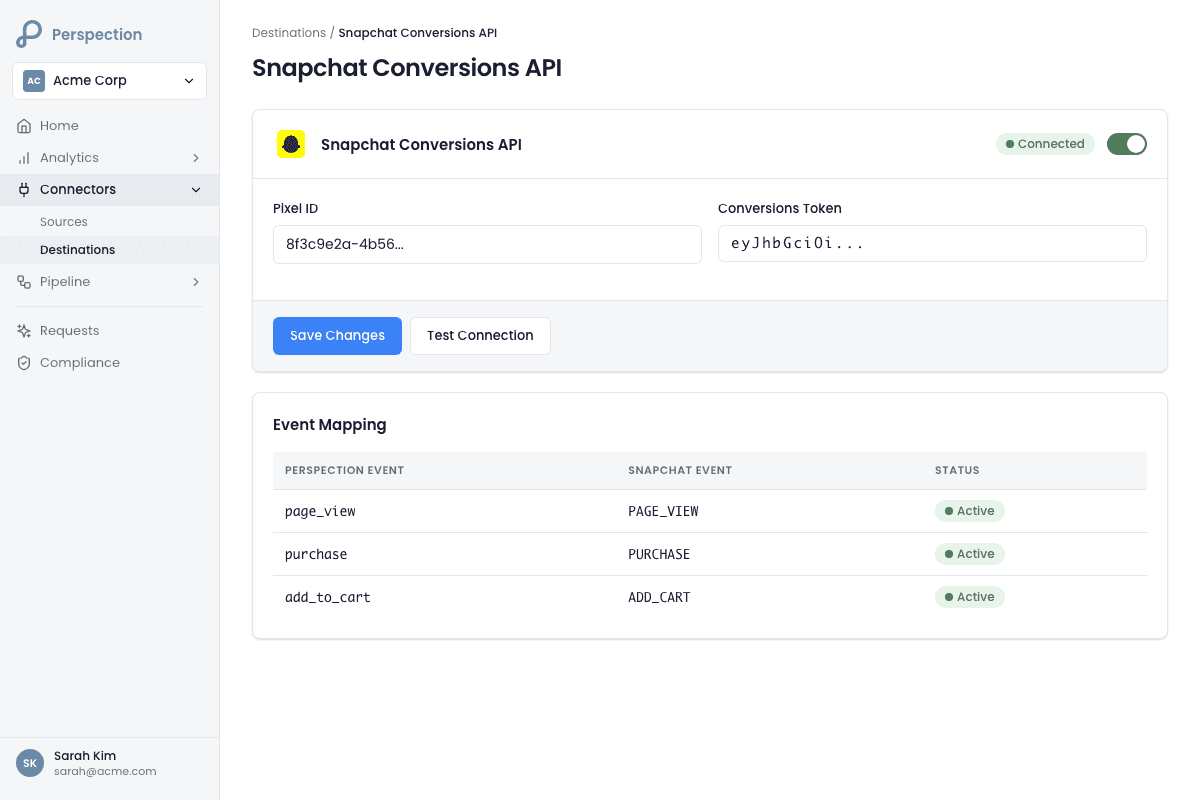
Under the destination list, locate the Snapchat card labeled "Conversions API." Click the card to expand the configuration form.
Paste the Pixel ID into the Pixel ID field. The field placeholder shows the expected UUID format:
xxxxxxxx-xxxx-xxxx-xxxx-xxxxxxxxxxxx.Paste the Access Token into the Access Token field. The field uses a password mask to protect the credential.
Toggle the Live switch to enabled.
Click Save. Perspection creates the destination, encrypts the Access Token at rest in the data plane database, and displays a "Live" health badge.
Click Test to send a validation PAGE_VIEW event to the Snapchat Conversions API v2 endpoint. Perspection reports the connection test result and latency in milliseconds.
Required and optional fields
Field | Required | Format | Source |
|---|---|---|---|
Pixel ID | Yes | UUID ( | Snap Ads Manager > Events Manager |
Access Token | Yes | Bearer token starting with | Snap Marketing API > Conversions API |
Perspection stores destination credentials in the destinations.destinations table in the data plane database, encrypted and scoped to the workspace's tenant ID with row-level security.
Common setup errors
Error | Cause | Resolution |
|---|---|---|
| Invalid or expired Access Token | Regenerate the Conversions API token in Snap Ads Manager |
| Pixel ID format is incorrect or does not belong to the ad account | Verify the UUID matches the Pixel ID in Events Manager exactly |
| Access Token lacks conversion event write permissions | Regenerate the token with the |
What data does Perspection send to Snapchat?
Perspection sends 5 data categories to Snapchat for every event: event metadata (type, Pixel ID, timestamp, conversion type), user identifiers (hashed email, hashed phone, external_id, Snap Click ID, IP, user agent), custom data (currency, value, transaction_id, item_ids, item_category, page_url), a client_dedup_id for deduplication, and an event_conversion_type of WEB, MOBILE_APP, or OFFLINE.
Event payload structure
The Snapchat connector transforms every Perspection event into the Snapchat Conversions API v2 data format. The following tables show the complete field mapping:
Event Metadata
Snapchat Field | Source in Perspection | Example |
|---|---|---|
| Destination config |
|
| Mapped from |
|
|
|
|
| Derived from |
|
User Data
Snapchat Field | Source in Perspection | Hashing |
|---|---|---|
|
| SHA-256 (lowercased, trimmed) |
|
| SHA-256 (digits only) |
|
| Sent as-is |
| Extracted from | Sent as-is (Snap Click ID) |
|
| Sent as-is |
|
| Sent as-is |
Custom Data (for purchase, cart, and commerce events)
Snapchat Field | Source in Perspection |
|---|---|
|
|
|
|
|
|
|
|
|
|
|
|
|
|
|
|
|
|
Event name mapping
Perspection automatically maps raw event names to Snapchat standard event types:
Perspection Event | Snapchat Standard Event |
|---|---|
|
|
|
|
|
|
|
|
|
|
|
|
|
|
|
|
|
|
|
|
|
|
|
|
All other events | Event name uppercased (e.g., |
Internal events such as identify, session_start, page_hidden, and consent update events are automatically skipped by the Perspection processing pipeline and never dispatched to Snapchat.
Event conversion type classification
The Snapchat Conversions API requires an event_conversion_type field that classifies the source of each conversion. Perspection determines the conversion type automatically:
Source |
| When Applied |
|---|---|---|
Browser SDK events |
| Default for all browser-originated events |
Mobile app events |
| When |
CSV uploads, COD webhooks |
| When |
Snap Click ID capture and attribution
The Perspection browser SDK automatically captures the Snap Click ID from landing page URL parameters. When a user clicks a Snapchat ad, Snapchat appends either ScCid or sclid as a URL query parameter. The Perspection SDK reads both parameter variants at page load and stores the Snap Click ID in the click_ids JSONB payload alongside other platform click IDs (fbclid, gclid, ttclid, and others).
During dispatch, the Snapchat connector extracts the Snap Click ID using a three-tier fallback pattern:
JSONB
click_idscolumn (preferred):click_ids.ScCidorclick_ids.sclidIndividual database columns (migration fallback):
event.ScCidorevent.sclidProperties object (SDK event fallback):
properties.ScCidorproperties.sclid
The Snap Click ID is the single most valuable attribution signal for Snapchat because the Snap Click ID provides a direct, deterministic link between the ad click and the conversion event. Without the Snap Click ID, Snapchat relies on probabilistic matching using hashed email, hashed phone, and IP address, which produces lower match rates.
Deduplication via client_dedup_id
Perspection sets the custom_data.client_dedup_id field to the Perspection event_id (UUID v4) for every event dispatched to Snapchat. When both the Snapchat browser Pixel and Perspection server-side dispatch fire for the same user action, Snapchat uses the client_dedup_id to deduplicate the two signals and count the conversion exactly once. Without the client_dedup_id, advertisers running both the Snapchat Pixel and Perspection server-side tracking would see inflated conversion counts in Snap Ads Manager.
How do you verify Snapchat conversion events?
Perspection provides 3 verification methods for Snapchat: the built-in connection test (sends a test PAGE_VIEW event with latency reporting), Snapchat's Events Manager in Snap Ads Manager (confirms events with parameter details), and the Perspection destination health dashboard (success rates, error codes, latency percentiles). Use all three during initial setup to confirm end-to-end flow.
Method 1: Perspection connection test
Navigate to Connectors > Destinations in the Perspection dashboard and expand the Snapchat destination card.
Click the Test button. Perspection sends a test
PAGE_VIEWevent to the Snapchat Conversions API v2 endpoint using the configured Pixel ID and Access Token. The test event usestest_mode: true, which tells Snapchat to validate the payload without counting the event as a real conversion.Review the result. Perspection displays "Connection test successful!" with latency in milliseconds for a passing test, or an error message with the Snapchat API HTTP status code for a failing test.
Common test failure causes: expired Access Token (HTTP 401), incorrect Pixel ID format (HTTP 400), insufficient API permissions (HTTP 403), or network connectivity issues (timeout).
Method 2: Snapchat Events Manager validation
Open Snap Ads Manager and navigate to Events Manager.
Select the Snap Pixel connected to the Perspection workspace.
Open the Event Activity or Test Events view to see incoming server-side events.
Trigger a tracked action on the website connected to the Perspection workspace -- for example, view a product page (triggers
VIEW_CONTENT), add an item to cart (triggersADD_CART), or complete a purchase (triggersPURCHASE).Return to Snap Events Manager within 60 seconds. Server-side events should appear showing the event type, timestamp, user data parameters (hashed_email, hashed_phone_number, click_id, ip_address, user_agent), and custom data (value, currency, transaction_id).
Verify that the
event_conversion_typeshowsWEBfor browser-originated events.Confirm the
client_dedup_idis populated, which ensures deduplication against the Snapchat browser Pixel.
Method 3: Perspection destination health monitoring
Open the Pipeline section in the Perspection dashboard.
Review dispatch status for the Snapchat destination. Perspection displays real-time delivery metrics including success rate, error rate, average latency, and most recent error messages.
Check for common Snapchat API errors:
401 Unauthorized-- Access Token has expired or been revoked. Regenerate the token in Snap Ads Manager.400 Bad Request-- Payload validation failed. Check that the Pixel ID matches the UUID format and that required fields (event_type, timestamp) are present.429 Too Many Requests-- Rate limit exceeded. Perspection automatically tracks the 1,000 requests per minute limit and backs off with exponential retry.500 Internal Server Error-- Snapchat server-side issue. Perspection retries automatically with exponential backoff up to 3 attempts (500ms, 1,000ms, 2,000ms delays).
For detailed guidance on monitoring destination health across all connected platforms, see Destination Health Monitoring.
Ongoing monitoring with Event Match Quality
After verifying initial event delivery, monitor the quality of data Perspection sends to Snapchat using the Event Match Quality coaching panel. The EMQ panel aggregates data completeness across the last 7 days, identifying missing parameters that reduce Snapchat attribution accuracy. The most impactful actions for improving Snapchat EMQ are:
Capture the Snap Click ID -- Deploy Perspection first-party domain tracking to preserve
ScCid/sclidbeyond Safari ITP limits.Collect email at checkout -- Ensure the checkout form captures email before the purchase event fires. Perspection's identity resolution pipeline automatically associates the email with the user's event stream.
Include phone numbers when available -- Hashed phone number provides a secondary matching signal when the Snap Click ID is unavailable (organic traffic, repeat visitors after cookie expiry).
Pass product details in commerce events -- Include
product_ids,quantity,value, andcurrencyin purchase and add-to-cart event properties.
Methodology
All Snapchat Conversions API configuration steps in this guide were verified against the Perspection production dashboard and Snapchat Ads Manager as of February 2026.
"The single highest-impact action for improving Snapchat Conversions API attribution is preserving the Snap Click ID -- the
ScCidorsclidparameter appended to the landing page URL when a user taps a Snapchat ad. The Snap Click ID provides deterministic, click-level attribution that Snapchat trusts more than probabilistic matching via hashed email or IP address. Perspection's browser SDK captures bothScCidandsclidURL parameters at page load and stores the Snap Click ID in theclick_idsJSONB payload. However, Safari ITP can strip or expire the URL parameter before the SDK reads the parameter on slow-loading pages. Deploying Perspection's first-party domain tracking ensures the Snap Click ID persists in a first-party cookie beyond ITP restrictions, which is why advertisers using Perspection first-party domains see measurably higher Snapchat attributed conversions compared to standard browser pixel implementations." -- Perspection Engineering Team
Sources & References
Snapchat -- Conversions API Documentation, https://marketingapi.snapchat.com/docs/#conversions-api
Snapchat Business -- Ads Manager Help, https://businesshelp.snapchat.com/
Snapchat -- Snap Pixel and CAPI, https://businesshelp.snapchat.com/s/article/snap-pixel
Perspection Product Guide -- Event Match Quality, /library/event-match-quality-guide
Perspection Product Guide -- Destination Health, /library/destination-health-failed-events-guide