How to Connect Perspection to Pinterest Conversions API for Server-Side Tracking
Connect Pinterest Conversions API Tracking | Perspection
Step-by-step guide to connect Perspection to the Pinterest Conversions API. Configure Ad Account ID, Access Token, event mapping, and PII hashing.
Perspection sends conversion events directly from Perspection servers to the Pinterest Conversions API v5 endpoint, bypassing browser-side tracking failures caused by ad blockers, Safari ITP cookie restrictions, and iOS App Tracking Transparency. Perspection automatically hashes email and phone data with SHA-256 before dispatch, maps common event names to Pinterest standard events (page_visit, checkout, add_to_cart, signup, lead, search, view_category), attaches the Pinterest click ID (epik) for click-to-conversion attribution, and retries failed deliveries with exponential backoff. Setup requires only a Pinterest Ad Account ID and an Access Token with ads:write scope. The entire connection takes under 5 minutes from the Perspection dashboard.
How does server-side Pinterest conversion tracking work?
The Pinterest Conversions API enables Perspection to send conversion events directly from Perspection servers to Pinterest servers over a secure HTTPS connection, bypassing the visitor's browser. Server-side events supplement the Pinterest Tag by capturing conversions that browser-based tracking misses due to ad blockers, Safari ITP cookie restrictions, or iOS App Tracking Transparency.
Pinterest advertisers traditionally rely on the Pinterest Tag -- a JavaScript snippet running inside the visitor's browser -- to track page visits, add-to-cart actions, and purchases. Three forces degrade Pinterest Tag accuracy in 2026:
Ad blockers: Extensions like uBlock Origin, Brave Shield, and Firefox Enhanced Tracking Protection block outbound requests to
ct.pinterest.comandanalytics.pinterest.com, silently dropping Pinterest Tag events before the events leave the browser.Safari Intelligent Tracking Prevention (ITP): Safari caps JavaScript-set cookies at 7 days of expiry. The Pinterest
_epikcookie -- which stores the Pinterest click ID for conversion attribution -- expires after 7 days of user inactivity, breaking return-visitor attribution chains on Safari.iOS App Tracking Transparency (ATT): Apple requires explicit opt-in for cross-app tracking on iOS 14.5 and later. When users deny the ATT prompt, the Pinterest Tag loses access to device-level identifiers.
Perspection eliminates all three failure points. When the Perspection SDK captures an event on a website, the Perspection processing pipeline enriches the event with identity-resolved user data, hashes PII fields using SHA-256, extracts the Pinterest click ID (epik) from stored click IDs, and dispatches the enriched event from Perspection infrastructure to the Pinterest Conversions API v5 endpoint at https://api.pinterest.com/v5/ad_accounts/{ad_account_id}/events.
Because Perspection operates a first-party tracking domain on behalf of each workspace, the Perspection SDK sets cookies under the merchant's own domain. Safari ITP treats Perspection first-party cookies as genuine first-party storage, extending cookie lifetime beyond 7 days and preserving the _epik click ID that the Pinterest Conversions API requires for click-to-conversion attribution.
The Pinterest Conversions API accepts events with an action_source of web, app, or offline. Perspection automatically sets the action_source based on event origin: browser-originated events default to web, app events set to app, and offline events (such as CSV uploads or in-store conversions) set to offline.
How do you connect Perspection to the Pinterest Conversions API?
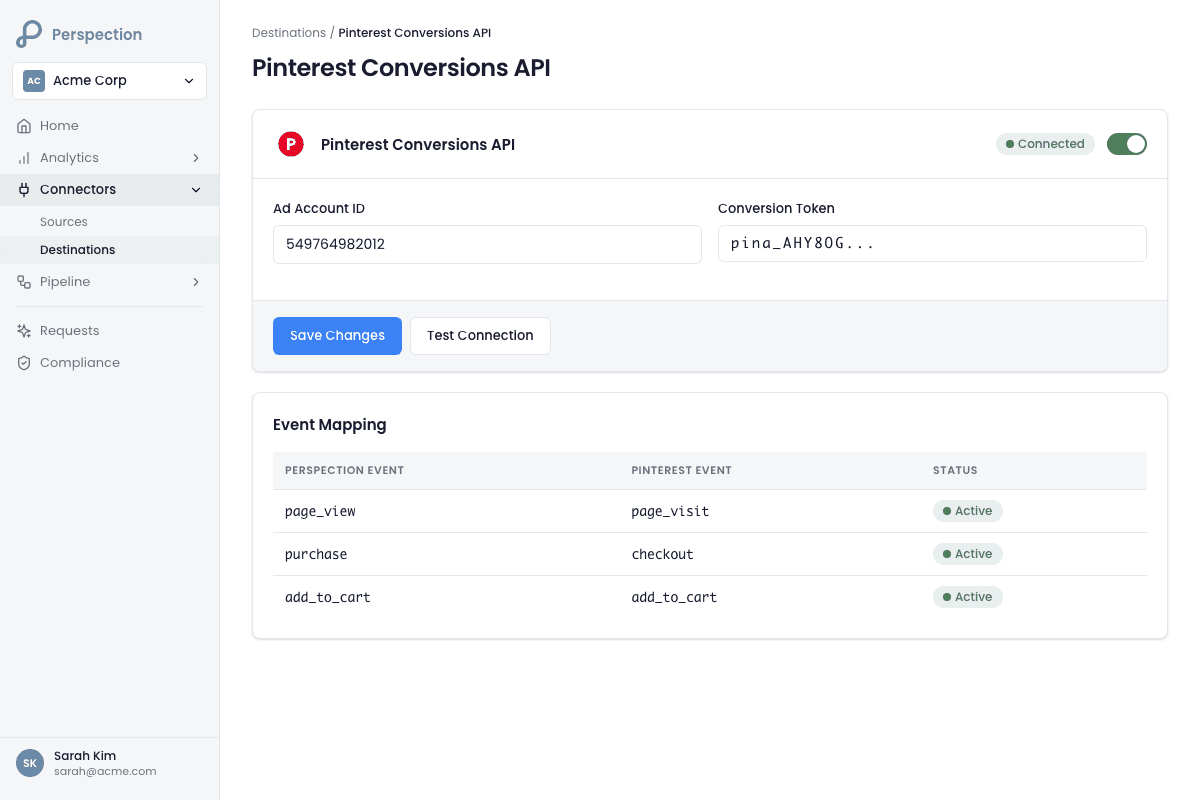
Open the Perspection dashboard, navigate to Connectors then Destinations, select Pinterest, enter the Ad Account ID from Pinterest Business Hub, paste the Access Token from the Pinterest Developer App with ads:write scope, and click Save. Perspection validates the connection by querying the Pinterest Ad Account endpoint to confirm credentials.
Step-by-step: Generate Pinterest Conversions API credentials
Open Pinterest Business Hub and log in to the Pinterest Business account associated with the ad campaigns receiving conversions.
Click Ads in the top navigation and select the ad account from the account dropdown.
Copy the Ad Account ID displayed in the account selector. The Ad Account ID follows a numeric format, for example
123456789012.Open the Pinterest Developer Portal and navigate to Apps in the developer dashboard.
Select the developer app or create a new app if no app exists.
Generate a new Access Token with the following scopes:
ads:readandads:write. The access token starts withpina_followed by an alphanumeric string.Store the Access Token securely. Pinterest does not display the full token again after generation.
Step-by-step: Configure the destination in Perspection
Log into the Perspection dashboard and select the workspace that should send events to Pinterest.
Open Connectors > Destinations from the left navigation.
Under Available Destinations, click the Pinterest card labeled "Conversions API."
Paste the Ad Account ID into the Ad Account ID field.
Paste the Access Token into the Access Token field.
(Optional) Enter a Conversion Token for enhanced server-side conversion tracking. The Conversion Token provides additional authentication for workspaces that require enhanced security.
Toggle the Live switch to enabled.
Click Save. Perspection creates the destination and displays a "Live" health badge.
Click Test to validate the connection. Perspection sends a GET request to the Pinterest Ad Account API endpoint (
/v5/ad_accounts/{ad_account_id}) to confirm the Access Token and Ad Account ID are valid. Perspection reports "Connection test successful!" or displays the specific Pinterest API error message.
Required and optional fields
Field | Required | Format | Source |
|---|---|---|---|
Ad Account ID | Yes | Numeric ( | Pinterest Business Hub > Ads > Account dropdown |
Access Token | Yes | String starting with | Pinterest Developer App > Generate Token (ads:write scope) |
Conversion Token | No | String starting with | Pinterest Developer App (enhanced tracking) |
What data does Perspection send to Pinterest?
Perspection sends each event to the Pinterest Conversions API v5 with the event name mapped to a Pinterest standard event, Unix timestamp, action_source, SHA-256-hashed email and phone arrays, the Pinterest click ID (epik), client IP, user agent, external_id, and custom data including value, currency, content_ids, content_category, content_brand, num_items, order_id, and search_query.
The Perspection Pinterest connector (running on the Perspection dispatch worker) transforms raw events from the Perspection SDK into the Pinterest Conversions API payload schema before dispatch. The connector maps each field to the exact parameter name that the Pinterest API expects.
Event name mapping
Perspection automatically translates common event names to Pinterest standard events:
Perspection Event | Pinterest Standard Event | Description |
|---|---|---|
|
| User visits a page |
|
| User completes a purchase |
|
| User adds item to cart |
|
| User creates an account |
|
| User submits a lead form |
|
| User performs a search |
|
| User views a product or category |
Custom event names that do not match the mapping table pass through to Pinterest unchanged. Pinterest accepts custom event names for flexible tracking beyond the seven standard events.
User data parameters
Perspection Field | Pinterest API Parameter | Format | Purpose |
|---|---|---|---|
email_hash |
| SHA-256 hash array | Primary identity matching |
phone_hash |
| SHA-256 hash array | Secondary identity matching |
external_id |
| String array | Cross-device identity stitching |
epik (Pinterest click ID) |
| Raw string | Click-to-conversion attribution |
client_ip_address |
| IPv4/IPv6 string | Geographic and session matching |
client_user_agent |
| Full UA string | Device fingerprinting |
Perspection automatically extracts the Pinterest epik click ID from the stored click IDs using a three-tier fallback pattern: first from the JSONB click_ids column (new sparse-storage format), then from individual columns (legacy format), and finally from the properties object (SDK events). When the epik value is present, Perspection includes the epik as the click_id parameter in the Pinterest payload, enabling Pinterest to attribute the conversion back to the originating ad click.
Custom data parameters
Perspection Field | Pinterest API Parameter | Purpose |
|---|---|---|
currency |
| Transaction currency code (defaults to workspace currency or USD) |
value |
| Transaction monetary value |
content_ids / product_ids |
| Product SKU identifiers for catalog matching |
category |
| Product category for interest-based targeting |
brand |
| Product brand for brand-level reporting |
product_name |
| Product name for creative optimization |
quantity / num_items |
| Number of items in the transaction |
order_id |
| Unique order identifier for deduplication |
search_term / search_query |
| Search terms for search event tracking |
PII hashing
Perspection hashes personally identifiable information before sending data to Pinterest. The Perspection BaseConnector class provides the hashing methods:
Email: Converted to lowercase, trimmed of whitespace, then hashed with SHA-256 to produce a 64-character hexadecimal string.
Phone: Non-digit characters are stripped, then the cleaned number is hashed with SHA-256 to produce a 64-character hexadecimal string.
Pinterest receives only the hashed values -- Perspection never transmits plaintext email addresses or phone numbers to the Pinterest API.
Consent handling
Perspection respects user consent signals when dispatching events to Pinterest. The Pinterest event payload includes an opt_out flag in custom_data that Perspection sets to true under any of the following conditions:
The user's CCPA consent field (
ccpa_opt_out) equalstrue.The user's
ad_storageconsent is set todenied.The user's
ad_user_dataconsent is set todenied.The event properties include
opt_out: true.
When opt_out is true, Pinterest excludes the event from audience building and ad targeting while still counting the conversion for reporting purposes.
Sample Pinterest API payload
For a purchase event, Perspection sends a payload structured as follows:
How do you verify Pinterest conversion events?
Click the Test button on the Pinterest destination card to validate the Ad Account ID and Access Token via the Pinterest API. Then trigger a real event on the website and check Pinterest Ads Manager under Reporting for incoming server events. Use the Perspection Sent Data tab to confirm successful delivery.
Step-by-step: Verify with the Perspection connection test
In the Perspection dashboard, navigate to Connectors > Destinations and expand the Pinterest destination card.
Click the Test button. Perspection sends a validation request to the Pinterest API endpoint at
https://api.pinterest.com/v5/ad_accounts/{ad_account_id}.Perspection reports the result as "Connection test successful!" with the response latency in milliseconds, or displays the specific Pinterest API error message if the connection fails.
Common failure causes: expired Access Token, incorrect Ad Account ID, Access Token missing
ads:writescope, or network connectivity issues between Perspection servers and the Pinterest API.
Step-by-step: Verify in Pinterest Ads Manager
Open Pinterest Ads Manager and select the correct ad account.
Navigate to Reporting and filter by conversion source to isolate server-side (Conversions API) events.
Check the conversion event counts to confirm server-side events are arriving. Pinterest typically processes Conversions API events within 1-5 minutes of receipt.
Verify that the event names match expectations:
page_visitfor page views,checkoutfor purchases,add_to_cartfor cart additions,signupfor account registrations, andleadfor form submissions.
Step-by-step: Verify in the Perspection dashboard
In the Perspection dashboard, navigate to the workspace Home Dashboard to view the event delivery overview.
Check the Destination Health monitoring panel for the Pinterest destination. The health badge should show "Live" (green) for healthy delivery, "Degraded" (yellow) for intermittent failures, or "Down" (red) for persistent failures.
Review the dispatch status to confirm events are being delivered successfully. Perspection tracks the success rate, average latency, and error count for each destination.
Monitor the Event Match Quality score to ensure Perspection is sending sufficient identity signals. Higher data completeness translates to better conversion attribution on Pinterest.
Troubleshooting common issues
Symptom | Likely Cause | Resolution |
|---|---|---|
"401 Unauthorized" error | Expired or invalid Access Token | Generate a new Access Token from the Pinterest Developer App with ads:write scope |
"403 Forbidden" error | Access Token missing required scopes | Regenerate the token with both |
"404 Not Found" error | Incorrect Ad Account ID | Verify the Ad Account ID in Pinterest Business Hub > Ads > Account dropdown |
Events dispatched but no data in Pinterest Reporting | Processing delay or event name mismatch | Wait 5-10 minutes for Pinterest to process events; verify event names match Pinterest standard events |
Rate limit errors | Exceeding 1,000 API calls per hour | Perspection automatically queues and retries rate-limited events after the reset window |
How does Perspection handle rate limits and retries for Pinterest?
The Pinterest Conversions API enforces rate limits tracked by a per-destination counter in Perspection. When Pinterest returns HTTP 429, the Pinterest connector retries with exponential backoff starting at 500 milliseconds, doubling on each attempt up to 3 retries. Non-retriable errors (HTTP 4xx other than 429) route to the Dead Letter Queue.
Rate limiting
The Perspection dispatch worker maintains a rate limit tracker for each Pinterest destination. The BaseConnector class resets the rate limit counter every 60 seconds. When a dispatch attempt detects zero remaining capacity, the event is re-queued for dispatch after the reset window.
Retry behavior
HTTP Status | Retriable | Perspection Action |
|---|---|---|
200 | N/A | Success, event delivered |
429 (Rate Limited) | Yes | Exponential backoff retry (500ms, 1s, 2s) |
500-599 (Server Error) | Yes | Exponential backoff retry (500ms, 1s, 2s) |
400-499 (Client Error, non-429) | No | Log error, route to Dead Letter Queue |
Retry timing
The Perspection retry mechanism uses exponential backoff with a base delay of 500 milliseconds:
First retry: 500ms after initial failure
Second retry: 1,000ms after first retry failure
Third retry: 2,000ms after second retry failure
After 3 failed retry attempts, the event is marked as failed and routed to the Perspection Dead Letter Queue. Workspace administrators can review and manually retry failed events from the DLQ management panel.
How does Perspection map events differently for Pinterest compared to Meta CAPI?
Perspection maps events to Pinterest using a distinct event name vocabulary because Pinterest defines different standard event names than Meta. Where Meta uses "PageView" and "Purchase," Pinterest uses "page_visit" and "checkout." The Meta CAPI connector sends fbp and fbc cookies; the Pinterest connector sends the epik click ID. Pinterest uses content_brand and search_query fields with no Meta equivalent.
Key differences between Pinterest and Meta event dispatch
Dimension | Pinterest Connector | Meta Connector |
|---|---|---|
API endpoint | Pinterest API v5 | Meta Graph API v21.0 |
Purchase event name |
|
|
Page view event name |
|
|
Sign-up event name |
|
|
Click ID parameter |
|
|
Browser ID parameter | Not applicable |
|
Brand field |
| Not a standard parameter |
Search field |
|
|
Deduplication |
|
|
Rate limit | 1,000 calls/hour | 200 calls/second per Pixel |
Consent flag |
|
|
Both connectors share the same PII hashing logic from the Perspection BaseConnector class: SHA-256 hashing for email (lowercase, trimmed) and phone (digits only). Both connectors use the same exponential backoff retry mechanism with 3 attempts and a 500ms base delay.
Methodology
All Pinterest Conversions API configuration steps in this guide were verified against the Perspection production dashboard and Pinterest Ads Manager as of February 2026.
"For Pinterest advertisers, the single most impactful action for improving conversion attribution is capturing the
epikclick ID. Theepikparameter is Pinterest's equivalent of the Facebookfbccookie -- theepiklinks an ad click to a downstream conversion. Perspection's first-party domain setup preserves theepikcookie beyond Safari ITP's 7-day restriction, which means return visitors who click a Pinterest ad and convert 10 or 14 days later are still attributed correctly. Advertisers using Perspection first-party domains with Pinterest server-side tracking see materially higher attributed conversions compared to standard Pinterest Tag implementations, because the Pinterest Tag loses theepikvalue after 7 days on Safari." -- Perspection Engineering Team
How does Perspection map events to Pinterest conversion parameters?
Perspection provides a visual and JSON-based event mapping editor that customizes how Perspection events translate to Pinterest Conversions API events. The editor supports event name remapping, property remapping via dot-notation paths, event ignoring, and toggling between drag-and-drop visual mode and raw JSON mode.
Beyond the default event name mapping, Perspection provides a visual and JSON-based event mapping editor for customizing how Perspection events translate to Pinterest events. The mapping editor supports:
Event name remapping: Map a custom source event name (for example
product_viewed) to a specific Pinterest event name (for exampleview_category).Property remapping: Map source properties to Pinterest-specific custom data keys using dot-notation paths (for example
properties.pricemapped tovalue).Event ignoring: Mark specific source events to skip dispatch to Pinterest entirely.
Visual and JSON modes: Toggle between a drag-and-drop visual editor and a raw JSON editor for advanced configurations.
To configure event mapping, expand the Pinterest destination card in the Perspection dashboard, scroll to the Event Mapping section, and add mapping rules. Save the mapping configuration separately from the destination credentials.
Sources & References
Pinterest -- Conversions API Documentation, https://developers.pinterest.com/docs/conversions/conversions/
Pinterest -- Conversion Event Types, https://developers.pinterest.com/docs/conversions/event-data/
Pinterest Business -- Ads Manager Help, https://help.pinterest.com/en/business
Perspection Product Guide -- Event Match Quality, /library/event-match-quality-guide
Perspection Product Guide -- First-Party Tracking Domain, /library/first-party-tracking-domain-guide