Connect Google Analytics 4
GA4 Measurement Protocol Server-Side Tracking Guide
Connect Perspection to GA4 via Measurement Protocol. Send server-side events that bypass ad blockers with Consent Mode v2 support.
Perspection connects to Google Analytics 4 through the GA4 Measurement Protocol, sending server-side events directly from Perspection's processing infrastructure to Google's collection endpoint at google-analytics.com/mp/collect. The GA4 connector requires two credentials -- a Measurement ID (format G-XXXXXXXXXX) and a Measurement Protocol API Secret -- both available from the GA4 Admin panel under Data Streams. Server-side dispatch bypasses browser ad blockers, preserves session continuity through client_id stitching, maps 26+ event types to GA4 recommended events, enforces Consent Mode v2 signals (ad_user_data, ad_personalization), and includes a quality scoring system that rates every dispatched event on a 100-point scale across 4 factors. The GA4 Measurement Protocol accepts a maximum of 25 events per request with a 130 KB payload limit, and the production endpoint returns a 204 No Content response with no error feedback -- making the debug endpoint essential for validation.
How does server-side GA4 tracking via the Measurement Protocol work?
The GA4 Measurement Protocol allows Perspection to send event data directly from server infrastructure to Google Analytics 4 without relying on the browser. Server-side events travel from Perspection's dispatch worker to google-analytics.com/mp/collect over an authenticated HTTPS POST. Server-side dispatch bypasses ad blockers, browser privacy restrictions, and JavaScript execution failures that cause client-side tracking to lose 15-30% of events.
How the GA4 Measurement Protocol operates
The GA4 Measurement Protocol is a server-to-server HTTP API. Perspection's dispatch worker constructs a JSON payload containing the client_id, event name, event parameters, and optional user_id, then sends the payload to Google's collection endpoint with the Measurement ID and API Secret as query parameters.
Key constraints of the GA4 Measurement Protocol:
Maximum 25 events per request -- The Measurement Protocol rejects payloads containing more than 25 events. Perspection sends one event per request to maximize parameter fidelity per event.
130 KB payload limit -- Perspection's GA4 connector validates payload size before dispatch and throws an explicit error if the serialized JSON exceeds 130,000 bytes.
204 No Content response -- The production endpoint (
/mp/collect) returns a 204 status code for every request, regardless of whether the payload contained valid data. Google provides no error feedback on the production endpoint.Debug endpoint for validation -- The debug endpoint (
/debug/mp/collect) returns a JSON response withvalidationMessagesdetailing any payload issues. Perspection uses the debug endpoint during connection testing but not during live dispatch.Event name rules -- Event names must be alphanumeric with underscores, start with a letter, and not exceed 40 characters. Reserved prefixes (
firebase_,ga_,google_) are automatically prefixed withpsp_by Perspection's connector.Maximum 25 custom parameters per event -- Each parameter key is limited to 40 characters; string values are limited to 100 characters.
Server-side GA4 tracking complements client-side gtag.js rather than replacing gtag.js. Client-side gtag.js handles automatic events like session_start, first_visit, and user_engagement that the Measurement Protocol cannot send. Perspection's GA4 connector explicitly skips these reserved event names to avoid conflicts.
For information on connecting Google Ads Enhanced Conversions, see Connect Google Ads.
How do you connect Perspection to Google Analytics 4?
Connecting Perspection to Google Analytics 4 requires two credentials: the Measurement ID (format G-XXXXXXXXXX, from GA4 Admin under Data Streams) and a Measurement Protocol API Secret (generated in GA4 Admin under Data Streams, then Measurement Protocol API Secrets). Setup takes under 2 minutes and Perspection validates the connection by sending a test page_view event to the GA4 debug endpoint.
Step-by-step setup
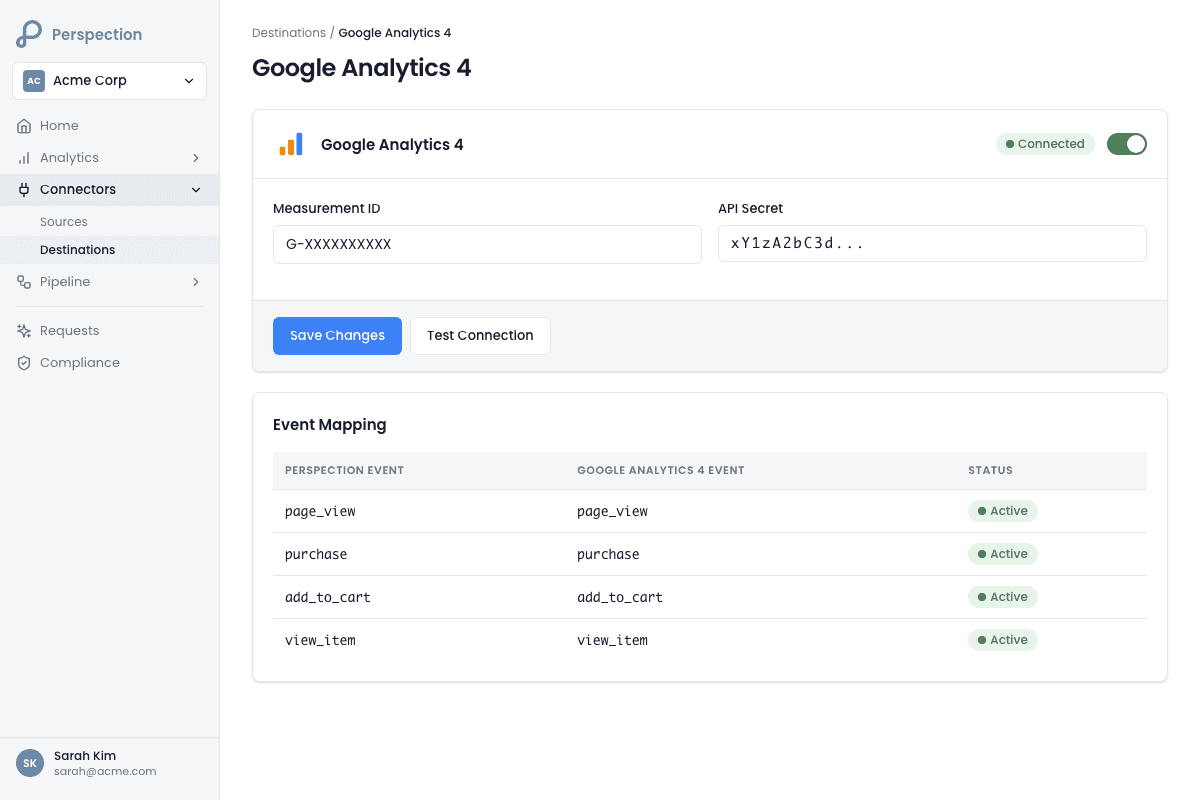
Open the Perspection dashboard and navigate to Connectors in the sidebar, then select Destinations.
Locate the Google Analytics 4 card in the destination list. The card displays the label "Google Analytics 4" with the subtitle "Measurement Protocol." Click the card to expand the configuration form.
Enter the Measurement ID:
Open Google Analytics in a separate tab.
Navigate to Admin (gear icon in the bottom-left corner).
Under the Property column, click Data Streams.
Select the web data stream for the website.
Copy the Measurement ID displayed at the top of the stream details (format:
G-XXXXXXXXXX).Paste the Measurement ID into the "Measurement ID" field in Perspection.
Generate and enter the API Secret:
In the same GA4 Data Stream detail page, scroll down to Events and find Measurement Protocol API Secrets (or navigate to Admin > Data Streams > select stream > Measurement Protocol API Secrets).
Click Create to generate a new API secret.
Enter a nickname (e.g., "Perspection Server-Side") and click Create.
Copy the generated Secret value.
Paste the API Secret into the "API Secret" field in Perspection.
Click Save to store the GA4 destination configuration.
Click Test to validate the connection. Perspection sends a test
page_viewevent to the GA4 debug endpoint (/debug/mp/collect) and checks the response forvalidationMessages. A successful test confirms the Measurement ID and API Secret are valid.Toggle the destination to Live using the switch in the card header. Perspection begins dispatching events to the GA4 production endpoint.
The GA4 connector uses the password field type for the API Secret, ensuring the value is masked in the Perspection dashboard after entry.
How does Perspection maintain GA4 session continuity?
Perspection preserves the GA4 client_id using a 3-tier strategy: first, reading the _ga cookie from the browser SDK; second, deriving a stable client_id by hashing the visitor's identity_id or anonymous_id; third, generating a random client_id as a last resort. The _ga cookie path scores highest because GA4 uses client_id to stitch server-side events into the session initiated by gtag.js.
The client_id resolution hierarchy
The GA4 client_id is a dot-separated pair of numbers (e.g., 1234567890.1700000000) that GA4 uses to identify a unique browser instance. When gtag.js runs on a website, gtag.js creates a _ga cookie containing the client_id. Perspection's browser SDK captures the _ga cookie value and includes the _ga cookie value with every tracked event.
Perspection's GA4 connector resolves the client_id in the following priority order:
Native
_gacookie -- If the event payload contains a_gafield (captured from thegtag.jscookie or Perspection's own_persp_gacookie), the connector extracts the last two numeric segments. For a cookie value likeGA1.1.1234567890.1700000000, the connector returns1234567890.1700000000. Events with native_gacookies receive a client_id quality score of 100/100.Derived from identity -- If no
_gacookie is present, the connector hashes theidentity_idoranonymous_idinto a stable 10-digit number paired with the event timestamp. The derivedclient_idensures the same visitor always maps to the same GA4 user, but GA4 cannot stitch derived client_ids to existinggtag.jssessions. Events with derived client_ids receive a quality score of 60/100.Random fallback -- If neither a
_gacookie nor an identity identifier exists (which should not occur with properly installed SDK events), the connector generates a random 10-digit number with the current Unix timestamp. Random client_ids create orphaned sessions in GA4.
Session ID forwarding
Beyond the client_id, Perspection forwards the session_id parameter to GA4 when available. The connector handles multiple session ID formats:
GA4-native
ga4_session_id-- Passed directly as a string.Perspection session format (
sess_<timestamp_ms>_<random>) -- The connector extracts the timestamp portion and converts the timestamp from milliseconds to seconds.Other formats -- Passed as-is.
The session_id enables GA4 to attribute server-side events to the correct session, which is critical for session-scoped metrics like "sessions with conversions" and "engagement rate."
What GA4 event parameters does Perspection send?
Perspection maps 26+ event types to GA4 recommended events and enriches each with up to 25 custom parameters: client_id, user_id, timestamp_micros, page data (page_location, page_title, page_referrer), UTM parameters (source, medium, campaign), e-commerce fields (items, value, currency, transaction_id), and user properties for audience building (membership_tier, customer_type, lifetime_value_tier).
Event name mapping
Perspection automatically maps canonical event names to GA4 recommended events. The full mapping includes:
Perspection Event | GA4 Event | Category |
|---|---|---|
|
| Engagement |
|
| E-commerce |
|
| E-commerce |
|
| E-commerce |
|
| E-commerce |
|
| E-commerce |
|
| Engagement |
|
| Engagement |
|
| Identity |
|
| Identity |
|
| E-commerce |
Events not in the mapping table are sanitized into valid GA4 custom event names: lowercased, non-alphanumeric characters replaced with underscores, and truncated to 40 characters. Events with reserved prefixes (firebase_, ga_, google_) are automatically prefixed with psp_.
E-commerce parameter enrichment
For purchase and refund events, Perspection sends the full GA4 e-commerce schema:
value-- Total order value, parsed fromvalue,total_price, oramountfields.currency-- ISO 4217 currency code (e.g.,USD,SGD,EUR).transaction_id-- Mapped fromorder_id,transaction_id, ororder_number.items-- Array of up to 200 items, each containingitem_id,item_name,price,quantity,item_category, anditem_brand.shippingandtax-- When available from the source event.coupon-- Extracted fromdiscount_codeswhen present.
User properties
Perspection builds GA4 user-scoped properties for audience segmentation. The connector sends up to 25 user properties with string values capped at 36 characters:
membership_tier/account_type/customer_typecountry/region/languagesignup_methodlifetime_orders/lifetime_value_tier
User properties appear in GA4 under Configure > User Properties and can be used for audience definitions and exploration report segments.
How does Perspection handle GA4 Consent Mode v2?
Perspection sends 2 consent signals in the Measurement Protocol payload: ad_user_data and ad_personalization, each set to GRANTED or DENIED based on the visitor's consent state. When ad_personalization or ad_user_data is denied, Perspection also sets non_personalized_ads: true. GA4 uses consent signals to apply data thresholds, enable conversion modeling for cookieless pings, and restrict remarketing audience membership for non-consenting visitors.
Consent signal flow
Perspection's consent enforcement pipeline captures visitor consent preferences through the browser SDK and propagates consent state through the event processing pipeline to every destination connector. For the GA4 connector specifically:
Browser SDK captures consent -- The Perspection SDK collects consent signals for 4 categories:
ad_storage,analytics_storage,ad_user_data, andad_personalization. Consent signals are attached to every event as top-level fields.Processing worker enriches events -- The processing worker preserves consent fields through the enrichment pipeline without modification.
GA4 connector maps consent -- The GA4 connector reads
ad_user_dataandad_personalizationfrom the event payload and maps the values to GA4's Measurement Protocol consent format (GRANTEDorDENIED).Non-personalized ads flag -- When either
ad_user_dataorad_personalizationisdenied, the connector setsnon_personalized_ads: trueon the payload, instructing GA4 to exclude the event from remarketing audiences and personalized advertising.
What GA4 does with consent signals
analytics_storage: denied-- GA4 collects cookieless pings (no_gacookie is set). GA4 uses these pings for behavioral and conversion modeling to fill reporting gaps.ad_storage: denied-- GA4 does not store advertising cookies. Remarketing lists and Google Ads audience exports exclude these visitors.ad_user_data: DENIED-- GA4 does not send user-level data to Google advertising products.ad_personalization: DENIED-- GA4 does not use the event data for ad personalization or remarketing.
For a detailed guide on configuring consent enforcement across all destinations, see Consent Enforcement. For analytics reporting on consent rates, see Analytics Overview.
How do you verify GA4 server-side events?
Verify GA4 server-side events using 3 tools: GA4 Real-Time reports to confirm events arrive within 30 seconds, GA4 DebugView for parameter inspection, and the Perspection Sent Data tab to match event counts. The production endpoint returns 204 for every request regardless of validity, so checking GA4's reporting interface is required.
Verification workflow
Trigger a test event -- Open the tracked website in a browser and perform an action (e.g., a page view or add-to-cart). Ensure the Perspection browser SDK is installed and the workspace is receiving events.
Check Perspection dispatch status -- In the Perspection dashboard, navigate to Connectors > Destinations and verify the Google Analytics 4 card shows a "Live" status badge (green). If the destination was recently saved, Perspection sends a validation request to the GA4 debug endpoint and reports the result in the card.
Check GA4 Real-Time reports:
Open Google Analytics.
Navigate to Reports > Real-time.
Look for incoming events from Perspection. Server-side events appear in Real-Time reports within 5-30 seconds of dispatch.
Verify event names match expected GA4 recommended events (e.g.,
page_view,purchase,add_to_cart).
Use GA4 DebugView for parameter inspection:
In GA4, navigate to Admin > Data Display > DebugView.
DebugView shows individual events with all parameters. Look for
page_location,page_title,session_id,value, anditemsparameters.Note: DebugView only displays events sent with
debug_mode: truein the event parameters. To enable debug mode for Perspection events, contact Perspection support to activate thedebug_modeconfiguration flag on the GA4 connector.
Compare event counts -- After 24-48 hours of live dispatch, compare event totals in the Perspection analytics dashboard against GA4's standard reports under Reports > Engagement > Events. Minor discrepancies (1-3%) are normal due to GA4's data processing pipeline and sampling thresholds.
Quality scoring
Perspection's GA4 connector calculates a quality score (0-100) for every dispatched event across 4 weighted factors:
Factor | Weight | Scoring Criteria |
|---|---|---|
Client ID quality | 30% | 100/100 for native |
Event data quality | 30% | Completeness of e-commerce fields ( |
User data quality | 20% | Presence of |
Page data quality | 20% | Presence of |
Events scoring below 60 generate a warning in Perspection's dispatch logs with specific recommendations for improvement, such as "Capture _ga cookie from gtag.js for session stitching" or "Include items for product-level attribution."
Skipped events
Perspection's GA4 connector intentionally skips 16 event types that are internal-only or reserved by GA4:
Internal events:
identify,perspection_consent_update,javascript_error,page_hidden,page_visible,page_exit,experiment_exposureGA4 reserved events:
session_start,first_visit,user_engagement(GA4 infers these fromsession_idandclient_id)GTM noise:
cookie_consent_update,cookie_consent_statistics,cookie_consent_preferences,cookie_consent_marketing,gtm.dom,gtm.load,gtm.js
Methodology
All GA4 Measurement Protocol configuration details in this guide were verified against the Perspection production dashboard and live GA4 real-time reporting as of February 2026.
"The GA4 Measurement Protocol's silent 204 response is both a feature and a trap. Google designed the production endpoint to never reject payloads -- even malformed payloads return 204 -- which means teams can run a broken GA4 integration for weeks without noticing. Perspection solves this with the quality scoring system that evaluates every event before dispatch and the debug endpoint validation during connection testing. The most impactful optimization is ensuring the
_gacookie flows through to server-side events. Without the native_gacookie, GA4 cannot stitch server-side purchase events back to the ad click session that started the journey, which breaks attribution models and inflates direct/none traffic in acquisition reports." -- Perspection Engineering Team
Sources & References
Google Analytics -- Measurement Protocol (GA4), https://developers.google.com/analytics/devguides/collection/protocol/ga4
Google Analytics -- Consent Mode, https://developers.google.com/tag-platform/security/guides/consent
Google Analytics -- GA4 Event Parameters, https://developers.google.com/analytics/devguides/collection/protocol/ga4/reference/events
Perspection Product Guide -- Consent Enforcement, /library/consent-enforcement-compliance-guide
Perspection Product Guide -- Analytics Overview, /library/analytics-overview-data-view-guide