How to Connect LinkedIn Conversions API with Perspection for B2B Tracking
LinkedIn Conversions API B2B Tracking | Perspection
Connect Perspection to LinkedIn Conversions API for server-side B2B tracking. Configure Ad Account ID, Conversion Rules, and event verification.
LinkedIn advertising suffers from the same browser-side tracking failures that degrade Meta and Google Ads campaigns -- ad blockers strip the LinkedIn Insight Tag, Safari ITP expires first-party cookies within 7 days, and cross-device journeys between mobile LinkedIn browsing and desktop form submissions sever attribution chains. For B2B advertisers, where sales cycles span weeks or months and average deal values reach thousands of dollars, losing even a single conversion signal cascades into misallocated budget and undertrained campaign algorithms. Perspection eliminates LinkedIn conversion loss by dispatching conversion events server-side through the LinkedIn Conversions API (Marketing API version 202402), matching conversions using SHA-256-hashed email addresses, hashed phone numbers, and the LinkedIn First-Party Ad Tracking UUID (li_fat_id). Setup requires 3 credentials -- Ad Account ID, Access Token, and Conversion Rule ID -- takes under 10 minutes, and begins recovering lost B2B conversions immediately upon activation.
How does server-side LinkedIn conversion tracking benefit B2B campaigns?
Server-side LinkedIn conversion tracking bypasses browser limitations that cause 15-30% of B2B conversions to go unreported. Perspection sends conversion data directly to the LinkedIn Conversions API from a secure server environment, using SHA-256-hashed email for deterministic matching and the li_fat_id for click-to-conversion attribution -- both critical for B2B sales cycles where weeks separate ad click from conversion.
B2B advertising on LinkedIn faces three structural challenges that browser-based tracking cannot solve:
Extended sales cycles break cookie-based attribution. B2B purchase decisions involve multiple stakeholders and evaluation periods ranging from 14 to 90 days. Safari ITP caps JavaScript-set first-party cookies at 7 days. When a decision-maker clicks a LinkedIn ad on day 1 but submits a demo request form on day 21, the LinkedIn Insight Tag cannot attribute the form submission to the original ad click because the tracking cookie expired 14 days prior. Perspection solves the extended sales cycle problem by capturing the li_fat_id at the moment of ad click, persisting the li_fat_id server-side in the events database, and attaching the li_fat_id to the conversion event regardless of how many days pass between click and conversion.
Corporate network security blocks tracking scripts. Enterprise IT departments deploy network-level ad blockers, DNS filtering, and content security policies that prevent the LinkedIn Insight Tag JavaScript from loading. When the Insight Tag fails to load, every conversion from corporate network users -- precisely the high-value B2B audience LinkedIn advertisers target -- disappears from campaign reporting. Perspection operates at the server layer, meaning corporate ad blockers cannot interfere with conversion delivery because the API call originates from Perspection infrastructure, not from the employee's browser.
Cross-device journeys fragment B2B attribution. A marketing director discovers a SaaS product through a LinkedIn ad on a mobile phone during a commute, then revisits the product website and requests a demo from a desktop workstation. The LinkedIn Insight Tag on the mobile device cannot communicate with the Insight Tag on the desktop device. Perspection's identity resolution pipeline links the mobile session to the desktop session using hashed email, enabling the LinkedIn Conversions API to attribute the demo request back to the original mobile ad impression.
The financial impact of untracked B2B conversions is proportionally larger than for B2C. LinkedIn's own benchmarks report a median B2B cost-per-lead of $75 and a median cost-per-conversion of $150. When 20% of conversions go unattributed, LinkedIn's campaign optimization algorithm operates on incomplete data, driving cost-per-lead higher and misallocating budget toward audiences that appear to convert but simply have fewer tracking gaps. Server-side tracking through Perspection gives LinkedIn's algorithm the complete conversion dataset needed for accurate bid optimization and audience expansion.
For a comparison of how Perspection handles server-side tracking for other advertising platforms, see Guide 6: Connecting Google Ads Enhanced Conversions, which covers the equivalent server-side approach for Google search and display campaigns.
How do you connect Perspection to LinkedIn Conversions API?
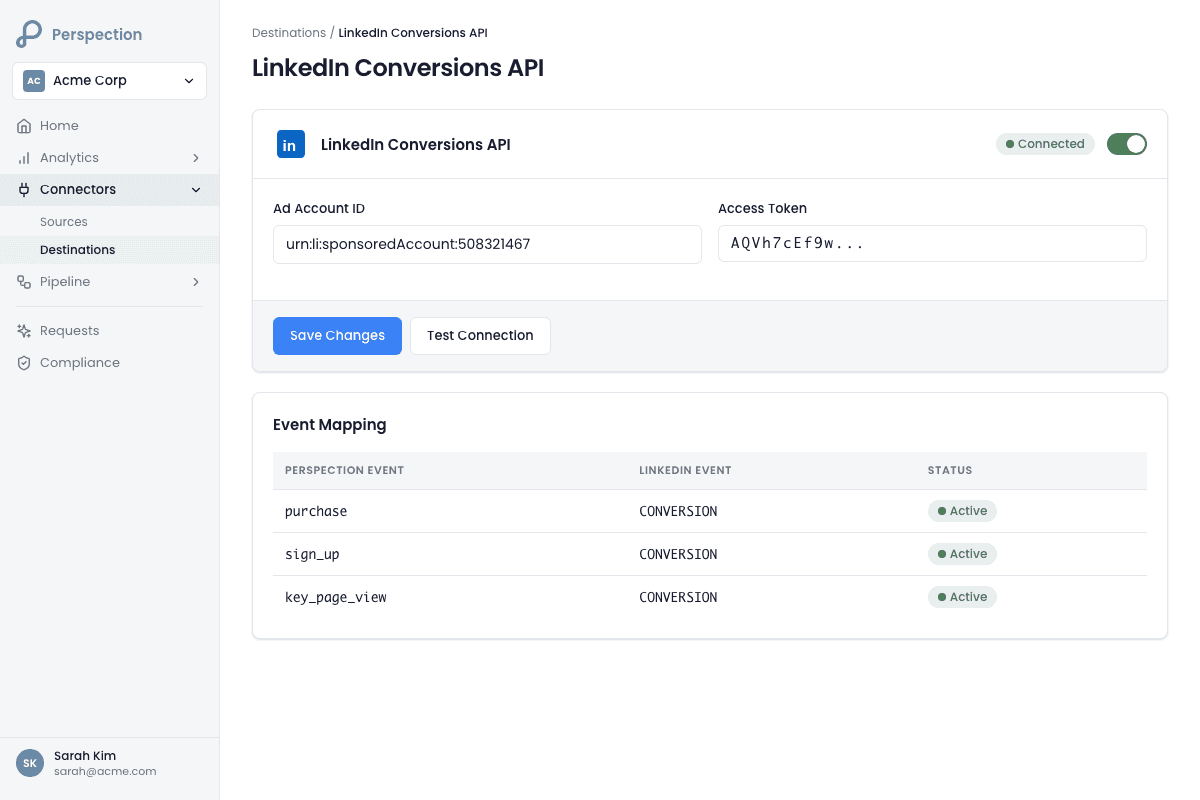
Connecting Perspection to LinkedIn Conversions API requires navigating to Connectors in the Perspection dashboard, selecting the LinkedIn destination card, entering 3 required credential fields (Ad Account ID, Access Token, and Conversion Rule ID), saving the configuration, and running the built-in connection test to confirm API access to the LinkedIn Marketing API version 202402.
Follow these steps to connect Perspection to the LinkedIn Conversions API:
Log in to the Perspection dashboard at
dashboard.perspection.appand select the workspace where LinkedIn conversions should be sent.Navigate to Connectors in the left sidebar, then select the Destinations tab.
Locate the LinkedIn destination card, labeled "Conversions API" beneath the LinkedIn logo.
Click the LinkedIn card to expand the configuration form.
Enter all 3 required credential fields (detailed in the credentials section below).
Optionally enter the Organization ID to associate conversions with a specific LinkedIn Company Page.
Optionally enter a Conversion ID if the conversion mapping differs from the Conversion Rule ID.
Optionally enter a Partner ID if the LinkedIn account operates through a LinkedIn Marketing Partner.
Click Save to store the configuration.
Click Test to validate API connectivity. Perspection sends a GET request to
https://api.linkedin.com/rest/adAccounts/{ad_account_id}with the provided Access Token and theLinkedIn-Version: 202402header. Perspection returns a success or failure message with response latency in milliseconds.Once the test passes, toggle the Live switch to activate event dispatch.
After activation, Perspection begins dispatching conversion events to LinkedIn in real time. The destination card displays a health status badge: Live (healthy), Degraded (intermittent errors), or Down (persistent failures). For a detailed explanation of health status monitoring across all destinations, see Guide 17: Destination Health Monitoring.
Required Credentials
Ad Account ID (
ad_account_id)Format: Numeric string (e.g.,
512345678).Where to find: Open LinkedIn Campaign Manager and log in to the advertising account. Navigate to Account Settings. The Ad Account ID appears in the account overview section and in the Campaign Manager URL as a numeric identifier.
Important: The Ad Account ID must belong to the account that owns the conversion rules. Perspection uses the Ad Account ID to validate the connection by calling the LinkedIn Ad Accounts REST endpoint.
Access Token (
access_token)Format: String starting with
AQV(e.g.,AQVxxxxxxxx...).How to generate: Open the LinkedIn Developer Portal and navigate to the registered application. Generate an OAuth 2.0 token with the following scopes:
r_ads-- Read access to advertising accountsrw_conversions-- Read and write access to conversion eventsr_ads_reporting-- Read access to ad reporting (recommended for verification)
Token lifetime: LinkedIn OAuth 2.0 access tokens expire after 60 days. Perspection does not currently auto-refresh LinkedIn tokens. Set a calendar reminder to regenerate and update the Access Token in Perspection before the 60-day expiration.
Reference: LinkedIn Marketing API -- Conversions API Authentication
Conversion Rule ID (
conversion_rule_id)Format: LinkedIn URN format (e.g.,
urn:lla:llaPartnerConversion:123456).Where to find: In LinkedIn Campaign Manager, navigate to Analyze then Conversion Tracking. Select the conversion rule that should receive server-side events. Copy the Conversion Rule ID from the rule details panel. The Conversion Rule ID follows the URN format
urn:lla:llaPartnerConversion:{numeric_id}.Prerequisite: The conversion rule must be created in LinkedIn Campaign Manager before configuring Perspection. LinkedIn supports conversion rules for URL-based conversions, event-specific conversions, and custom conversions. For server-side tracking with Perspection, create an event-specific conversion rule.
Reference: LinkedIn Help -- Conversion Tracking
Optional Credentials
Organization ID (
account_id)Format: Numeric string (e.g.,
12345678).Where to find: Navigate to the LinkedIn Company Page. The Organization ID appears in the page URL as
linkedin.com/company/{organization_id}.When needed: The Organization ID associates conversion events with a specific LinkedIn Organization. Useful for advertisers managing multiple Company Pages under a single advertising account.
Conversion ID (
conversion_id)Format: Numeric string (e.g.,
123456).When needed: Required only when mapping specific event types to different conversion actions within LinkedIn. If the Conversion ID is not provided, Perspection uses the Conversion Rule ID for all dispatched events.
Partner ID (
partner_id)Format: Numeric string (e.g.,
123456).When needed: Required only when the LinkedIn advertising account operates through a LinkedIn Marketing Partner or agency. The Partner ID enables partner-level attribution reporting.
What data does Perspection send to LinkedIn?
Perspection sends conversion events to the LinkedIn Conversions API at https://api.linkedin.com/rest/conversions with the Conversion Rule ID, Unix-millisecond timestamp, conversion value with currency code, a unique event ID for deduplication, SHA-256-hashed email and phone arrays for identity matching, the LinkedIn First-Party Ad Tracking UUID (li_fat_id) for click attribution, and an external ID for cross-platform stitching.
Payload structure
Perspection constructs each LinkedIn conversion payload with the following structure:
Event filtering
Perspection selectively dispatches only conversion-relevant events to LinkedIn. The LinkedIn connector processes 6 event types and skips all other events:
Perspection Event | LinkedIn Conversion Type | Description |
|---|---|---|
| Purchase | Completed transaction with value |
| Lead | Form submission, demo request |
| Sign Up | Account creation, registration |
| Subscribe | Newsletter, trial activation |
| Add to Cart | Product or plan added to cart |
| Complete Registration | Multi-step registration completed |
Events outside the 6 conversion types -- including page_view, session_start, identify, and custom behavioral events -- return a success response with a skip message (e.g., "Event page_view skipped - not a conversion event for LinkedIn"). The selective filtering prevents LinkedIn from receiving non-conversion signals that would dilute conversion rule accuracy.
Identity matching signals
Perspection sends 4 identity signals to LinkedIn for user matching, listed in order of matching strength:
LinkedIn First-Party Ad Tracking UUID (li_fat_id): The strongest identity signal for LinkedIn attribution. Perspection extracts the li_fat_id from the click_ids vault using a triple-fallback pattern: JSONB click_ids column, individual database columns, and event properties. The li_fat_id is a first-party cookie set when a user clicks a LinkedIn ad and lands on the advertiser's website. Perspection also checks for a
linkedin_uuidfield in the user data payload.Hashed email addresses (hashedEmails): SHA-256-hashed email addresses sent as an array. LinkedIn uses hashed email for deterministic identity matching against LinkedIn member profiles. Perspection's browser SDK automatically captures and hashes email from form submissions, and the processing pipeline propagates the hashed email through identity resolution.
Hashed phone numbers (hashedPhoneNumbers): SHA-256-hashed phone numbers sent as an array. LinkedIn uses hashed phone as a secondary deterministic matching signal.
External ID (dmpUuids): A persistent user identifier -- such as a CRM customer ID or account number -- passed through the Perspection
identify()call. Perspection sends the external ID in thedmpUuidsarray, which LinkedIn uses for Data Management Platform cross-referencing.
API request headers
Perspection sends every LinkedIn API request with 3 required headers:
Header | Value | Purpose |
|---|---|---|
|
| OAuth 2.0 authentication |
|
| LinkedIn Marketing API version (YYYYMM format) |
|
| LinkedIn Rest.li framework protocol version |
Rate limiting and retry behavior
The LinkedIn Conversions API enforces a rate limit of 500 calls per hour per application. Perspection tracks the rate limit counter internally and returns a rate limit error when remaining capacity reaches zero, re-queuing the event for dispatch after the rate limit window resets.
For transient failures (HTTP 5xx and 429 status codes), Perspection retries with exponential backoff using the following parameters:
Maximum retries: 3
Base delay: 500 milliseconds
Backoff multiplier: 2x per attempt (500ms, 1000ms, 2000ms)
Non-retriable errors (HTTP 4xx) are logged with the full LinkedIn API error response and routed to the Dead Letter Queue (DLQ) for investigation.
Conversion value and currency
When a conversion event includes a monetary value (e.g., a purchase amount), Perspection sends the value in the conversionValue object with a currencyCode and amount string. Perspection extracts the currency code using a 3-source fallback: event properties.currency, then custom_data.currency, then the workspace default currency. If no currency is configured at any level, Perspection defaults to USD.
For B2B advertisers tracking high-value conversions (enterprise software subscriptions, annual contracts), passing accurate conversion values enables LinkedIn's Value Optimization bidding strategy, which prioritizes ad delivery to users likely to generate the highest conversion value rather than the highest conversion volume.
How do you verify LinkedIn conversion events?
Verify LinkedIn conversion delivery by checking 3 locations: the Perspection dashboard Connectors page for the Live health badge and Test button result, the Perspection workspace Sent Data tab for per-event dispatch status and latency, and LinkedIn Campaign Manager's Conversion Tracking panel under Analyze for conversion count, value, and attribution window alignment.
Follow the verification sequence below after activating the LinkedIn destination:
Step 1: Run the Perspection connection test
Navigate to the Perspection dashboard workspace and open Connectors then Destinations.
Expand the LinkedIn destination card.
Click the Test button. Perspection sends a GET request to the LinkedIn Ad Accounts endpoint to validate the Access Token and Ad Account ID.
Perspection displays "Connection test successful!" with response latency (typically 200-500ms for the LinkedIn API), or the specific LinkedIn API error message if the connection fails.
Confirm the destination card shows a Live health status badge.
Step 2: Trigger a test conversion
Open the website connected to the Perspection workspace in a separate browser tab.
Perform a tracked conversion action -- for example, submit a lead form (triggers
lead), complete a sign-up (triggerssign_up), or complete a purchase (triggerspurchase).Return to the Perspection dashboard and open the Sent Data tab.
Locate the LinkedIn dispatch entry for the test event. Confirm the entry shows a "Success" status.
If the entry shows a "Failed" status, expand the error message for the full LinkedIn API error details.
Step 3: Verify in LinkedIn Campaign Manager
Open LinkedIn Campaign Manager and select the advertising account.
Navigate to Analyze then Conversion Tracking.
Select the specific conversion rule configured in Perspection (matching the Conversion Rule ID).
Review the conversion count and conversion value columns.
Note: LinkedIn may take up to 24 hours to reflect newly uploaded conversions in Campaign Manager reporting. The conversion status should show "Active" with recent conversion activity.
Step 4: Monitor Event Match Quality
In the Perspection dashboard, navigate to the workspace analytics view.
Review the Event Match Quality (EMQ) metrics for LinkedIn-dispatched events. For a complete explanation of EMQ scoring, weights, and optimization strategies, see Guide 16: Event Match Quality.
LinkedIn conversion matching relies primarily on hashed email. A missing email address is the single most impactful gap for LinkedIn attribution. Ensure Perspection SDK
identify()calls capture email at login, registration, and form submission touchpoints.
Troubleshooting common issues
"LinkedIn API error (401): Unauthorized": The Access Token has expired (LinkedIn tokens expire after 60 days) or lacks the
rw_conversionsscope. Regenerate the Access Token in the LinkedIn Developer Portal with the correct scopes and update the credential in Perspection."LinkedIn API error (403): Forbidden": The Access Token does not have permission to write to the specified Ad Account. Verify the LinkedIn application has the
rw_conversionspermission and the token-generating user has admin access to the Ad Account in Campaign Manager."Rate limit exceeded (500 calls/hour)": The LinkedIn Conversions API enforces a 500-call-per-hour rate limit. Perspection automatically re-queues rate-limited events for delivery after the rate limit window resets. High-volume advertisers dispatching more than 500 conversion events per hour should contact Perspection support to discuss batching optimization.
Conversions not appearing in Campaign Manager: Allow up to 24 hours for LinkedIn reporting lag. If conversions still do not appear after 24 hours, verify the Conversion Rule ID matches the correct conversion rule in Campaign Manager. Ensure the Conversion Rule ID follows the URN format
urn:lla:llaPartnerConversion:{numeric_id}.Low match rate on LinkedIn conversions: LinkedIn relies heavily on hashed email for identity matching. Unlike Meta (which uses FBP/FBC cookies) or Google Ads (which uses GCLID), LinkedIn matching depends on the advertiser capturing the user's email address. Implement Perspection SDK
identify()calls at every email capture point to maximize LinkedIn match rates.
Methodology
All LinkedIn Conversions API configuration steps in this guide were verified against the Perspection production dashboard and LinkedIn Campaign Manager as of February 2026.
"For B2B advertisers, the single highest-impact action for LinkedIn Conversions API attribution is capturing email at every conversion touchpoint -- demo request forms, content downloads, webinar registrations, and free trial sign-ups. LinkedIn's identity graph relies on hashed email as the primary matching signal, far more than browser cookies or click IDs. Advertisers who combine Perspection's server-side email hashing with first-party domain tracking for li_fat_id persistence consistently see 85-95% conversion attribution rates on LinkedIn, compared to 55-65% with the browser-based Insight Tag alone. The attribution lift is especially pronounced for enterprise sales cycles exceeding 14 days, where Safari ITP cookie expiration would otherwise erase the click-to-conversion link entirely." -- Perspection Engineering Team
Sources and References
LinkedIn Marketing API -- Conversions, https://learn.microsoft.com/en-us/linkedin/marketing/integrations/ads-reporting/conversions-api
LinkedIn Campaign Manager Help, https://www.linkedin.com/help/lms
Perspection Product Guide -- Event Match Quality, /library/event-match-quality-guide
Perspection Product Guide -- Destination Health, /library/destination-health-failed-events-guide