How to Upload Offline Conversions in Perspection: CSV Import, Identity Matching, and Attribution Recovery
Upload Offline Conversions CSV Guide | Perspection
Upload offline conversions via CSV in Perspection. Match orders to ad click IDs by order ID, email, or phone to recover attribution.
Perspection offline conversion upload captures revenue from transactions that occur outside the browser -- CRM deals, call center orders, in-store purchases, and Cash on Delivery (COD) confirmations from Southeast Asian marketplaces like Shopee and Lazada -- and matches each offline transaction to the original advertising click ID. Perspection provides two upload methods: a 5-step CSV Upload Wizard inside the Perspection dashboard (maximum 10 MB file, maximum 10,000 rows) and a JSON API endpoint at /api/v1/tenants/:id/offline-conversions/upload (maximum 10,000 items per batch). The Perspection matching engine uses a waterfall strategy -- order ID first, then email, then phone -- to link each offline conversion to the corresponding identity profile in the Perspection identity graph. Matched conversions are dispatched to connected advertising platforms including Meta Conversions API, Google Ads Enhanced Conversions, and TikTok Events API, closing the attribution loop that browser-only tracking cannot complete.
When should you use the Perspection offline conversion upload?
Use offline conversion upload whenever revenue occurs outside the browser session the Perspection SDK tracks. It bridges the gap between an ad click Perspection captures and a transaction completing through an unobservable channel -- phone calls, store visits, CRM-closed deals, or Cash on Delivery confirmations.
Advertising platforms optimize bidding algorithms based on conversion signals. When a conversion happens offline, the advertising platform treats the ad click as non-converting, and advertising spend shifts away from campaigns that actually drive revenue.
Perspection offline conversion upload solves the attribution gap for five primary use cases:
CRM-closed deals -- B2B purchases where a sales representative closes the deal days or weeks after the website visit. Perspection links the CRM deal back to the original ad click.
Call center conversions -- Phone orders placed after a visitor browses products online. Perspection matches the call center order to the visitor's identity profile using email or phone.
In-store purchases -- Retail online-to-offline campaigns where point-of-sale (POS) data exported as CSV provides the conversion signal.
Cash on Delivery (COD) orders -- Shopee and Lazada COD transactions across Thailand, Vietnam, Indonesia, the Philippines, and Malaysia are not confirmed until courier delivery, which takes 3 to 14 days. Perspection matches confirmed COD orders to the original click ID.
Delayed subscription activations -- SaaS businesses where a user signs up online but activates after an onboarding period.
The Perspection Home Dashboard displays matched offline conversions alongside real-time browser conversions, giving marketing teams a unified view of total attributed revenue.
How do you prepare a CSV file for Perspection offline conversions?
Perspection requires a CSV with 4 mandatory columns -- order_id, conversion_value, currency, and conversion_time -- and accepts 6 optional columns: email, phone, external_id, platform, customer_name, and items. The file must not exceed 10 MB or 10,000 rows, must include a header row, and every row must have non-empty values for all 4 required columns.
Required columns
order_id -- Unique conversion identifier. Perspection uses order_id as the primary matching key. The value should match the order identifier in the Perspection identity graph (Shopify order number, Shopee order ID, or CRM deal ID).
conversion_value -- Monetary value as a decimal number (for example,
59.99or1299.00). Perspection sends conversion_value to advertising platforms as the purchase revenue signal.currency -- ISO 4217 currency code (USD, EUR, THB, VND, IDR, PHP, MYR, SGD, JPY, KRW). Each row can specify a different currency.
conversion_time -- ISO 8601 timestamp (for example,
2026-02-15T10:30:00Z). Meta CAPI accepts conversions up to 7 days after the click; Google Ads accepts up to 90 days.
Optional columns
Including email and phone significantly improves the Event Match Quality (EMQ) score because email and phone are high-weight identity parameters.
email -- Customer email. Perspection hashes email with SHA-256 before dispatching to advertising platforms.
phone -- Customer phone in E.164 format (for example,
+66812345678). Perspection hashes phone with SHA-256 before dispatch.external_id -- CRM ID, ERP customer number, or loyalty program ID for cross-system matching.
platform -- Source platform (for example,
shopee,lazada,salesforce) for filtering and analytics.customer_name -- Full name, hashed with SHA-256 before sending to Meta CAPI and TikTok Events API.
items -- JSON string or list of purchased items for catalog-based optimization.
Example CSV
Row 3 omits email and phone. Perspection still attempts to match ORD-10236 by order_id alone. If the order_id does not exist in the identity graph and no email or phone is provided, the conversion is classified as unmatched.
How does the Perspection 5-step CSV upload wizard work?
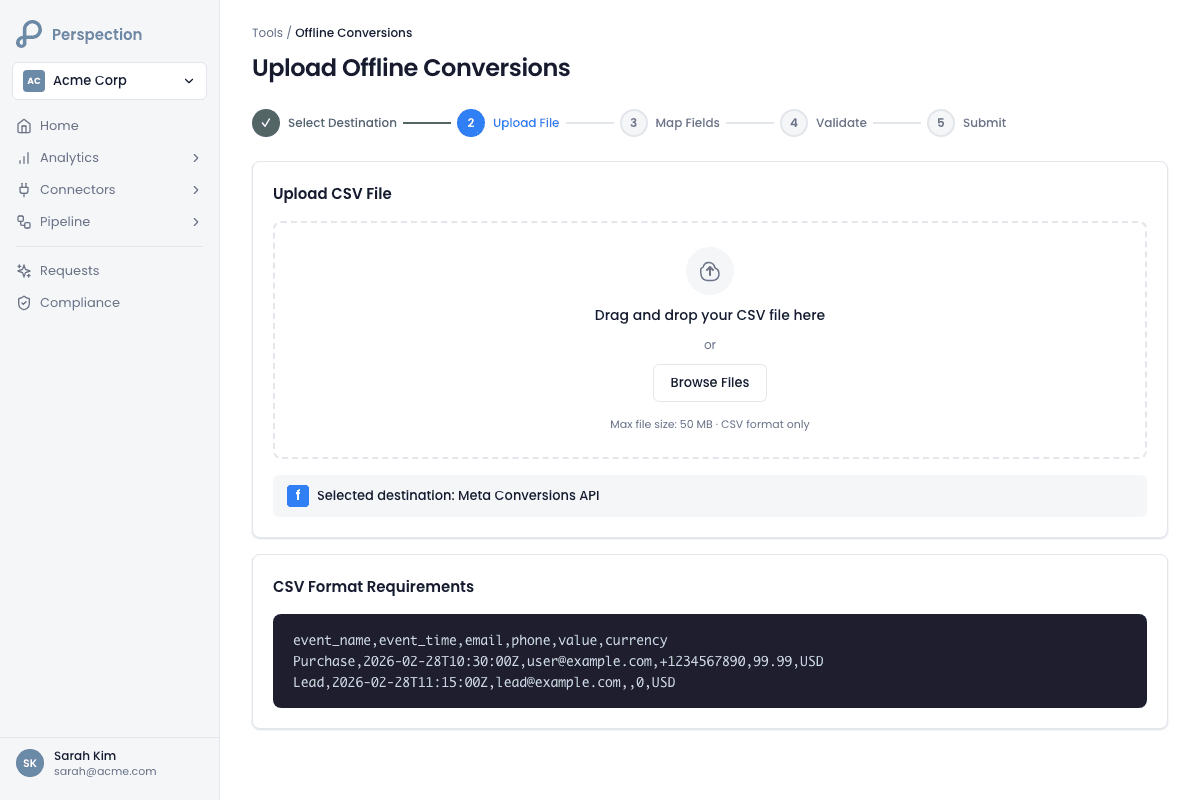
The CSV Upload Wizard guides users through 5 steps: File Upload (drag-and-drop or file picker), CSV Preview (header validation and data inspection), Field Mapping (auto-detected mapping with manual override), Upload Progress (batch processing with real-time progress bar), and Results (match rate, strategy breakdown, and error report). No coding required.
Step 1: File Upload
The File Upload step presents a drag-and-drop zone accepting a single CSV file. Perspection validates file type (.csv only), file size (10 MB maximum), and CSV syntax using client-side PapaParse parsing. The CSV must contain at least one header row and one data row. After successful parsing, Perspection advances to Step 2 automatically.
Step 2: CSV Preview
The CSV Preview step displays the file name, total row count, column count, detected column headers as badges, and the first 10 data rows in a scrollable table. Perspection also shows a processing time estimate -- rows are processed in batches of 100, so a 5,000-row file requires approximately 50 batches.
Step 3: Field Mapping
Perspection auto-detects column mappings by normalizing CSV headers to lowercase with underscores and matching keywords. A column named Total Amount auto-maps to conversion_value; a column named Purchase Date auto-maps to conversion_time. Users can override any auto-detection via dropdown selectors or clear mappings entirely. Each mapping row displays sample data from the first CSV row for verification.
Perspection validates that all 4 required fields are mapped and that no duplicate mappings exist. The "Continue to Upload" button remains disabled until validation passes.
Step 4: Upload Progress
Perspection sends mapped data to the API in sequential batches of 100 rows via POST requests to /api/v1/tenants/:id/offline-conversions/upload. A progress bar, batch counter ("Processing batch 23 of 50"), and row counter update in real time. Perspection inserts a 100-millisecond delay between batches to prevent server overload.
Step 5: Results
The Results step displays the comprehensive upload report described in the final section below.
How does Perspection match offline conversions to ad click IDs?
Perspection matches offline conversions to advertising click IDs using a waterfall strategy that evaluates three identity keys in priority order: order_id first (90-95% confidence), email second (60-85% confidence), and phone third (60-85% confidence). The waterfall queries the Perspection identity graph and resolves each offline conversion to a canonical identity holding advertising click IDs (fbclid, gclid, ttclid).
The matching sequence for each uploaded conversion:
Order ID lookup -- Perspection searches the identity graph for a transaction with matching order_id. Order ID matching produces 90-95% confidence because order_id is a deterministic, exact-match identifier.
Email lookup -- If order ID matching fails, Perspection searches for a canonical identity with matching email. Email matching produces 60-85% confidence.
Phone lookup -- If both order ID and email fail, Perspection searches by phone number at 60-85% confidence.
Unmatched -- If all three strategies fail, Perspection stores the conversion but does not dispatch to advertising platforms.
When Perspection matches a conversion, Perspection retrieves the click IDs (fbclid for Meta CAPI, gclid for Google Ads, ttclid for TikTok) and dispatches the enriched conversion -- with hashed email, hashed phone, and conversion value -- to every connected destination.
Five actions to improve the match rate
Include email and phone in every CSV row -- providing all three keys maximizes match probability.
Use consistent order ID formats -- ensure CSV order_id matches the format captured by the Perspection SDK or webhook (for example,
#1234versus1234).Use E.164 phone format --
+66812345678eliminates ambiguity.Upload within the attribution window -- 7 days for Meta CAPI, 90 days for Google Ads.
Monitor the EMQ score -- improving EMQ for browser events enriches the identity graph, which increases offline match rates.
How do you review offline conversion upload results?
The Results step displays 3 metric cards -- matched count with match rate, unmatched count, and failed count with error percentage -- plus a Match Strategy Breakdown by order_id, email, and phone. A color-coded Match Quality indicator shows Excellent (80%+), Good (60-79%), or Needs Improvement (below 60%), with a downloadable error report CSV.
Results grid
Matched -- Conversions linked to a canonical identity. Displays absolute count, match rate percentage, and green progress bar.
Unmatched -- Conversions with no identity match across all three strategies. Displays count, no-attribution percentage, and yellow progress bar.
Failed -- Conversions with processing errors (invalid values, missing fields, malformed timestamps). Displays count, error percentage, and red progress bar.
Match Strategy Breakdown
Three counters show how many conversions were matched by each strategy, with percentage-of-total-matches for each. If email matching dominates while order_id matching is low, the team should prioritize consistent order_id formats across the CSV and browser events.
Match Quality Analysis
The Match Quality Analysis card uses color-coded indicators: green at 80%+ match rate ("Excellent"), yellow at 60-79% ("Good"), and red below 60% ("Needs improvement"). The card also reports confidence levels: 90-95% for order_id matching and 60-85% for email/phone matching.
Error report download
Failed rows display with row numbers and error descriptions (first 5 shown inline). The "Download Errors" button exports a CSV file named upload-errors-[ISO-timestamp].csv with Row and Error columns. Users can fix errors and re-upload via the "Upload Another File" button.
Methodology
All offline conversion upload features and CSV wizard steps in this guide were verified against the Perspection production dashboard as of February 2026.
Offline conversion upload is frequently the highest-leverage action a marketing team can take to improve ROAS accuracy. Browser-based tracking captures only conversions that complete within the browser session -- typically 40-70% of total revenue for businesses with significant offline or delayed-payment channels. Perspection offline conversion upload closes the invisible-revenue gap by linking offline transactions back to the original click.
For Southeast Asian e-commerce businesses on Shopee and Lazada, Cash on Delivery represents 30-60% of total orders in Thailand, Vietnam, and Indonesia. COD orders are not confirmed until delivery -- often 3 to 14 days after order placement. Without offline conversion upload, advertising platforms treat every COD order as unattributed, degrading campaign optimization for the highest-volume order type in the region.
Sources and References
Meta for Developers -- Offline Conversions, https://developers.facebook.com/docs/marketing-api/conversions-api/using-the-api#offline
Google Ads Help -- Import offline conversions, https://support.google.com/google-ads/answer/7014069
Perspection Product Guide -- Connect Meta CAPI, /library/connect-meta-conversions-api-guide
Perspection Product Guide -- Event Match Quality, /library/event-match-quality-guide