Perspection Outbound Webhooks: The Complete Guide to Custom Event Routing and HMAC-SHA256 Signature Verification
Perspection Outbound Webhooks Custom Integration
Configure Perspection outbound webhooks with event filters, HMAC-SHA256 signatures, and delivery monitoring for custom endpoints.
Perspection outbound webhooks route processed customer events from the Perspection pipeline to any HTTP endpoint in real time. Each outbound webhook supports two filtering layers -- an event filter (include or exclude mode for specific event types) and a condition filter (JSON rule-based matching against event properties using 8 operators). Perspection signs every outbound webhook payload with HMAC-SHA256 using a per-webhook secret key, attaches the signature in the X-Perspection-Signature header, and retries failed deliveries up to 10 times with exponential backoff (2^n seconds). The Perspection dashboard displays delivery logs with HTTP status codes, response latency in milliseconds, success rates, and error messages for every webhook endpoint.
When should you use Perspection outbound webhooks?
Outbound webhooks route customer events to systems beyond built-in ad platform destinations. They deliver JSON payloads via HTTP POST to any publicly accessible URL, enabling real-time integrations with CRMs, data warehouses, alerting services, fraud detection, and custom analytics backends without requiring a native connector for each system.
5 Primary Use Cases for Perspection Outbound Webhooks
CRM synchronization -- Route
purchase,user_signup, andidentifyevents to Salesforce, HubSpot, or a custom CRM endpoint so that customer profiles update within seconds of a conversion event occurring on the website.Data warehouse ingestion -- Send all events (or a filtered subset) to a middleware endpoint that batches and loads event data into BigQuery, Snowflake, or Redshift for long-term analysis and custom reporting.
Real-time alerting -- Forward high-value
purchaseevents (filtered byproperties.value > 500) to a Slack webhook or PagerDuty endpoint so that sales teams receive instant notifications for large orders.Fraud detection -- Route
checkout_startedandpurchaseevents to a fraud scoring API that evaluates user behavior patterns before order fulfillment begins.Custom analytics pipelines -- Feed
page_view,button_click, andform_submissionevents into a proprietary analytics engine that calculates engagement scores or heatmap data outside of Perspection.
Outbound webhooks complement the built-in advertising destinations rather than replacing the built-in destinations. Events processed by the Perspection pipeline are dispatched to configured advertising destinations (Meta, Google, TikTok) and to outbound webhooks simultaneously. Outbound webhooks receive the same enriched event payload -- including identity-resolved user IDs, session data, UTM parameters, and consent flags -- that the Perspection processing pipeline produces.
For an overview of how events flow through the Perspection processing pipeline before reaching outbound webhooks, see the Perspection Home Dashboard Guide, which documents the 5-stage pipeline visualization (Validation, Deduplication, Normalization, Enrichment, Dispatch).
How do you create an outbound webhook in Perspection?
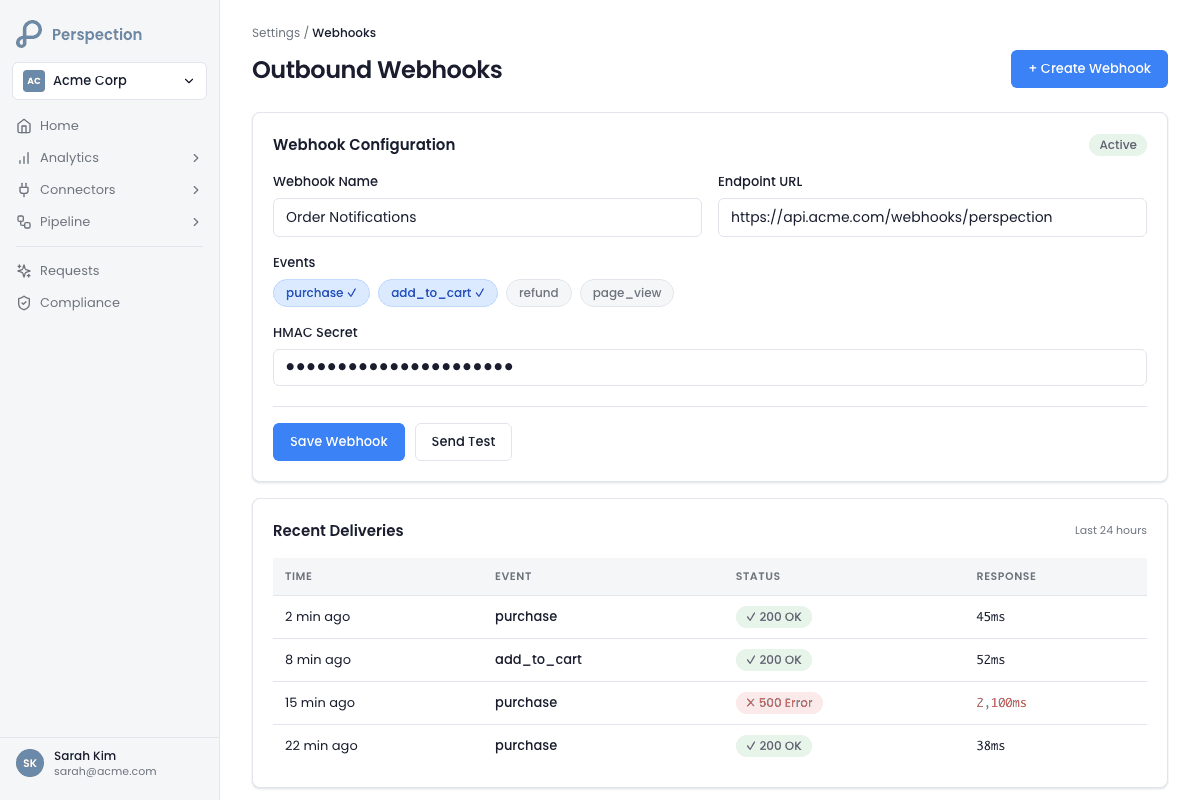
Creating a webhook requires a name and endpoint URL, plus 7 optional fields: description, enabled toggle, event filter, condition filter, retry count (0-10, default 3), timeout (1,000-30,000 ms, default 5,000), and HMAC-SHA256 secret key. The dashboard validates URL format and defaults webhooks to enabled.
Step-by-Step Webhook Creation
Open the Perspection dashboard and navigate to the workspace where the outbound webhook should be created. The workspace must have an active Perspection SDK installation sending events. For SDK installation instructions, see the Install Tracking on Your Website Guide.
Navigate to the Webhooks section within the workspace settings. The Webhooks page displays all existing webhook configurations in a responsive card grid (1 column on mobile, 2 columns on tablet, 3 columns on desktop).
Click the "Create Webhook" button in the top-right corner of the Webhooks page. The Create Webhook dialog opens as a modal overlay.
Enter the webhook name in the Name field. The name is a required field and should describe the webhook purpose (e.g., "Salesforce CRM Sync" or "Slack High-Value Alerts").
Enter the endpoint URL in the Endpoint URL field. The URL must be a valid, publicly accessible HTTPS URL. Perspection validates URL format on both the client side and server side before saving the webhook configuration. Localhost URLs will not receive deliveries in production environments.
Optionally add a description to provide additional context for team members who manage webhook configurations.
Set the enabled toggle. New webhooks default to enabled. Toggle the switch to disabled to save a webhook configuration without immediately activating event delivery.
Configure the retry count (default: 3, range: 0 to 10). The retry count determines how many times Perspection reattempts delivery after a failed HTTP request. Perspection uses exponential backoff for retry timing: the delay before retry attempt N equals 2^N seconds (2 seconds, 4 seconds, 8 seconds, 16 seconds, and so on).
Configure the timeout (default: 5,000 milliseconds, range: 1,000 to 30,000 milliseconds). The timeout defines how long Perspection waits for the receiving endpoint to respond before marking the delivery attempt as failed.
Click "Create" to save the webhook configuration. Perspection immediately begins evaluating incoming events against the webhook filters and delivering matching events to the configured endpoint.
Webhook Payload Structure
Every outbound webhook delivery sends an HTTP POST request with a JSON body containing the following fields:
HTTP Headers Sent with Every Delivery
Perspection attaches the following headers to every outbound webhook HTTP POST request:
Header | Description |
|---|---|
| Always |
|
|
| The event name (e.g., |
| The unique event identifier for idempotency checks |
| The delivery attempt number (starts at |
| HMAC-SHA256 signature of the payload (only present when a secret key is configured) |
Teams can also define custom headers in the webhook configuration. Custom headers are merged with the default Perspection headers and override any default header that shares the same key name.
How do you configure event filters and condition filters?
Webhooks support 2 filtering layers in sequence. The event filter uses "include" mode (deliver only listed types) or "exclude" mode (deliver everything except listed types). The condition filter applies property-level rules using 8 operators (equals, not equals, greater/less than, exists, contains) with AND logic -- every condition must pass.
Layer 1: Event Filter (Event Type Matching)
The event filter controls which event types reach the outbound webhook based on the event name. The event filter offers 2 modes:
Include mode -- Only events whose
event_namematches one of the selected event types are delivered. When include mode is active and no events are selected, the webhook matches all events (an empty include list acts as a wildcard).Exclude mode -- All events are delivered except those whose
event_namematches one of the selected event types. When exclude mode is active and no events are selected, no events are delivered.
The Perspection webhook dialog presents 10 common event types as selectable badges for quick configuration:
page_viewtrackidentifyform_submissionbutton_clickpurchaseadd_to_cartcheckout_starteduser_signupuser_login
Teams can also add custom event names by typing the event name into the custom event input field and pressing Enter. Custom event names appear as additional selectable badges below the common event list.
Layer 2: Condition Filter (Property-Level Rules)
The condition filter applies granular rules against any field in the event payload, including nested properties accessed via dot notation (e.g., properties.value, context.utm_source, properties.items.0.product_id). Each condition consists of 3 parts:
Field -- The dot-notation path to the event property being evaluated (e.g.,
properties.value).Operator -- One of 8 supported operators.
Value -- The comparison value (not required for the
existsoperator).
The 8 Condition Filter Operators
Operator | Label | Behavior | Example |
|---|---|---|---|
| Equals | Loose equality comparison |
|
| Not Equals | Loose inequality comparison |
|
| Greater Than | Numeric comparison (both sides cast to Number) |
|
| Less Than | Numeric comparison |
|
| Greater or Equal | Numeric comparison |
|
| Less or Equal | Numeric comparison |
|
| Exists | Checks that the field is not |
|
| Contains | String substring match or array membership check |
|
AND Logic for Multiple Conditions
When multiple conditions are configured, all conditions must evaluate to true for the event to pass the condition filter. Perspection applies AND logic across all conditions. To illustrate with a practical example:
Condition 1:
properties.value >= 100Condition 2:
properties.currency == "USD"Condition 3:
context.utm_source exists
An event must have a value of 100 or greater AND a currency of USD AND a non-null utm_source to pass all 3 conditions and reach the webhook endpoint. If any single condition fails, Perspection filters the event and does not deliver the event to the webhook.
Filter Execution Order
Perspection evaluates the event filter first and the condition filter second. When the event filter rejects an event (because the event type does not match the include list or does match the exclude list), Perspection skips condition evaluation entirely. The two-layer filtering architecture reduces unnecessary property lookups and improves delivery performance.
How do you verify webhook signatures using HMAC-SHA256?
Perspection signs every webhook payload with HMAC-SHA256 using a per-webhook secret key and delivers the hex-encoded signature in the X-Perspection-Signature header. Receiving endpoints must compute the HMAC-SHA256 digest of the raw request body, compare it against the header value using constant-time comparison, and reject mismatches.
How Perspection Generates the Signature
The Perspection webhook delivery service follows a 3-step signing process for every outbound delivery:
Perspection serializes the event payload to a JSON string using
JSON.stringify().Perspection creates an HMAC-SHA256 hash using the webhook's
secret_keyas the HMAC key and the JSON string as the message.Perspection encodes the resulting hash as a lowercase hexadecimal string and attaches the hex string to the
X-Perspection-Signatureheader.
When no secret key is configured for a webhook, Perspection omits the X-Perspection-Signature header entirely. Perspection strongly recommends configuring a secret key for every production webhook.
Node.js/Express Signature Verification Example
Python/Flask Signature Verification Example
7 Security Best Practices for Webhook Signature Verification
Always use constant-time comparison -- Use
crypto.timingSafeEqual()in Node.js orhmac.compare_digest()in Python. Standard string equality operators (===or==) are vulnerable to timing attacks that can leak the expected signature byte by byte.Parse the raw request body -- Compute the HMAC against the raw byte string of the HTTP request body, not against a parsed-and-re-serialized JSON object. Re-serializing the JSON body may reorder keys or alter whitespace, producing a different hash.
Store the secret key in environment variables -- Never hardcode webhook secret keys in application source code. Use environment variables, secrets managers (AWS Secrets Manager, Google Cloud Secret Manager, HashiCorp Vault), or encrypted configuration stores.
Enforce HTTPS on the receiving endpoint -- Webhook payloads may contain personally identifiable information (PII) including email addresses, phone numbers, and user IDs. Transmitting webhook payloads over unencrypted HTTP exposes customer data to interception.
Validate the event payload schema -- After verifying the signature, validate that the event payload contains the expected fields (
event_id,event_name,timestamp,properties) before processing the event. Schema validation prevents unexpected data structures from causing runtime errors.Implement idempotency using the
X-Perspection-Event-IDheader -- Perspection may deliver the same event more than once due to retry logic. Use theX-Perspection-Event-IDheader value as an idempotency key. Store processed event IDs in a cache (Redis, in-memory set, or database) and skip events that have already been processed.Return HTTP 200 within 5 seconds -- Perspection defaults to a 5,000-millisecond timeout. If the receiving endpoint does not respond within the configured timeout, Perspection marks the delivery as failed and schedules a retry. Process webhook events asynchronously (e.g., enqueue the event for background processing) and return HTTP 200 immediately.
How do you monitor webhook delivery in Perspection?
The dashboard provides 3 monitoring layers: summary statistics on each webhook card (total, successful, and failed deliveries plus success rate); a detailed delivery log with HTTP status codes, response latency, and error messages; and a built-in test function that validates filter matching against a sample event without sending an HTTP request.
Webhook Card Statistics
Each webhook configuration displays as a card on the Webhooks page. Every webhook card shows the following real-time statistics:
Total Deliveries -- The cumulative count of delivery attempts Perspection has made to the webhook endpoint since the webhook was created.
Successful Deliveries -- The count of deliveries that received an HTTP 2xx response from the endpoint.
Failed Deliveries -- The count of deliveries that received a non-2xx response, timed out, or encountered a connection error.
Success Rate -- Calculated as
(successful_deliveries / total_deliveries) * 100, displayed as a percentage with one decimal place. The success rate badge uses color coding: green for healthy delivery rates, red for failing webhooks.Last Delivery Timestamp -- The date and time of the most recent delivery attempt.
Last Delivery Error -- When the most recent delivery failed, the webhook card displays the error message (e.g., "ECONNREFUSED", "timeout", "HTTP 502").
Webhook Status Indicators
Each webhook card displays a status icon based on the last delivery result:
Green checkmark -- The last delivery succeeded (status:
delivered).Red X circle -- The last delivery failed (status:
failed).Amber spinning arrow -- A delivery is currently being retried (status:
retrying).Gray clock -- The webhook is disabled or has not yet received a delivery attempt.
Delivery Logs
Clicking into a webhook configuration opens the delivery log, which displays individual delivery attempts in reverse chronological order (most recent first). Each delivery log entry includes:
Field | Description |
|---|---|
Event ID | The unique identifier of the event that triggered the delivery |
Event Type | The event name (e.g., |
Attempt Number | Which delivery attempt the log entry represents (1 = first attempt, 2 = first retry) |
HTTP Status Code | The HTTP response code returned by the receiving endpoint (e.g., 200, 502, null for timeout) |
Response Time (ms) | The time in milliseconds between sending the HTTP request and receiving the response |
Status | One of 4 values: |
Error Message | The error description for failed deliveries (e.g., "AbortError: The operation was aborted" for timeouts) |
Attempted At | The timestamp when the delivery attempt was made |
Delivered At | The timestamp when a successful response was received (null for failed attempts) |
The delivery log supports pagination with configurable limits (default: 50 entries per page) and offset-based navigation for reviewing historical delivery data.
Retry Behavior and Exponential Backoff
When a delivery attempt fails, Perspection schedules a retry using exponential backoff. The retry delay calculation follows the formula 2^attempt_number seconds:
Attempt 1 fails -- Retry scheduled after 2 seconds.
Attempt 2 fails -- Retry scheduled after 4 seconds.
Attempt 3 fails -- Retry scheduled after 8 seconds.
Attempt 4 fails -- Retry scheduled after 16 seconds.
Subsequent attempts -- Continue doubling until the configured retry count is exhausted.
After all retry attempts are exhausted, Perspection marks the delivery as permanently failed and stops attempting delivery for the specific event. The background retry worker processes up to 100 pending retries per cycle, fetching the original event payload from the events.raw_events table and redelivering the event with the next attempt number.
Testing Webhook Filter Configuration
The Perspection dashboard includes a "Test" button on each webhook card. Clicking "Test" sends a sample event through the webhook filter engine without making an HTTP request to the endpoint URL. The test function evaluates the sample event against both the event filter and condition filter and returns one of 2 results:
Test passed -- The sample event matches the filters and would be delivered to the endpoint.
Test failed -- The sample event does not match the filters. Perspection displays the specific reasons for the mismatch, including whether the event filter or condition filter rejected the event and which individual conditions failed.
The test sample event contains the following default payload:
Teams should verify that the webhook filter configuration produces the expected test result before enabling the webhook for production traffic.
For a detailed understanding of how Perspection processes and enriches events before webhook delivery, see the Perspection Home Dashboard Guide, which covers the 5-stage processing pipeline.
Methodology
All outbound webhook configuration options, event filtering capabilities, and HMAC signature verification details in this guide were verified against the Perspection production dashboard as of February 2026.
"Outbound webhooks solve a fundamental problem in customer data infrastructure: every team has at least one system that no CDP natively integrates with. Rather than building custom connectors for every internal tool, outbound webhooks give engineering teams a universal escape hatch. The two-layer filter architecture -- event type matching followed by property-level conditions -- was designed to prevent webhook endpoints from drowning in irrelevant traffic. A typical e-commerce site generates 50 to 100 page view events for every purchase event. Without event-level filtering, a CRM webhook would receive 99 percent noise. The condition filter adds the second level of precision: routing only high-value purchases or purchases from specific UTM campaigns to alerting endpoints. The exponential backoff retry strategy (2, 4, 8, 16 seconds) balances delivery reliability against overwhelming a temporarily unhealthy endpoint. Teams should always configure a secret key and verify HMAC-SHA256 signatures on the receiving side -- an unsigned webhook endpoint is functionally an unauthenticated public API that accepts writes from anyone who discovers the URL."
-- Perspection Product Engineering Team
Sources and References
HMAC -- RFC 2104, https://datatracker.ietf.org/doc/html/rfc2104
Webhooks Best Practices, https://webhooks.fyi/best-practices/
Perspection Product Guide -- Event Transformers, /library/event-transformers-field-mapping-guide
Perspection Product Guide -- Home Dashboard, /library/home-dashboard-guide